I. Core Logic: Why Are Your Cards Always a "Mess of Image and Text"?
In AIGC game development, a common pain point for developers is that while Midjourney creates beautiful art, it struggles with complex UI layouts, often rendering text as gibberish. Nanobanana, built on the Google Gemini 3 Pro architecture, solves this problem with its powerful logical reasoning and SOTA text rendering capabilities.
To generate the perfect card, you must master "Container-Content Layering". We need to structure the prompts to force the AI to distinguish between the "physical frame (Container)" and the "internal illustration (Content)".
Below, we will demonstrate how to use JSON structured prompts and natural language instructions through 7 distinct style case studies to generate ready-to-use game assets.
II. Case Study Library: 7 Mainstream Card Style Prompts
The prompts provided in this section are logically optimized for the Nanobanana platform. For best results, use the Nano Banana Pro (Gemini 3 Pro) model.
1. High Fantasy Creature Card
Scenario: TCG games like Hearthstone or Magic: The Gathering.
Key Technique: Distinguishing materials (Gold vs. Parchment) to prevent image bleeding; utilizing OCR capabilities for precise title generation.

Prompt (Template):
Task: Create a high-quality fantasy trading card asset.
Layout:
*   Frame: An ornate heavy gold filigree border with embedded ruby gemstones in the corners. Use an antique metal texture.
*   Text Box: Below the illustration, a parchment paper texture box.
*   Stats Icon: In the bottom right corner, a cracked stone shield icon displaying the number "10" in red.
Content (Illustration):
*   Inside the frame, a dramatic oil painting of a "Frost Giant" wielding a massive ice club in a snowstorm.
*   Style: Blizzard entertainment concept art, dynamic lighting, cinematic composition.
Typography:
*   Inside the parchment box, strictly render the text "FROST GIANT" in a bold, black, medieval serif font. Ensure the text is legible and centered.
💡 Design Insight:
Gemini understands spatial logic like "Below the illustration," avoiding the traditional AI error of printing text directly on the character's face.
2. Cyberpunk HUD Item Card
Scenario: Sci-Fi RPGs, Future Warfare themes.
Key Technique: Translucent material rendering, Monospaced digital fonts, Glow effect control.

Prompt (Template):
Context: Design a futuristic sci-fi trading card with a digital HUD interface style.
Structure:
*   Border: A sleek, glowing cyan neon frame with hexagonal mesh patterns. Material should look like holographic glass projection.
*   Subject: Center is a 3D render of a "Plasma Rifle" weapon floating in zero gravity. Matte black finish with glowing blue energy coils.
*   UI Overlay: A semi-transparent dark blue tech-panel at the bottom.
Data:
*   Render the text "PLASMA RIFLE" in a white, monospaced digital font (console style).
*   Top left corner features a yellow warning triangle icon.
Aesthetic: High-tech, glitch art aesthetic, unreal engine 5 render, ray tracing.
💡 Design Insight:
Using "Holographic glass" and "Monospaced font" is key. Gemini's understanding of Sci-Fi UI far exceeds pure image models, accurately recreating the "floating" feel of game interfaces.
3. Structured RPG Potion Card (JSON)
Scenario: Batch generation for RPG inventory icons or cards.
Key Technique: JSON Parameterized Prompting. This format is extremely effective for Gemini, maximizing structural stability.
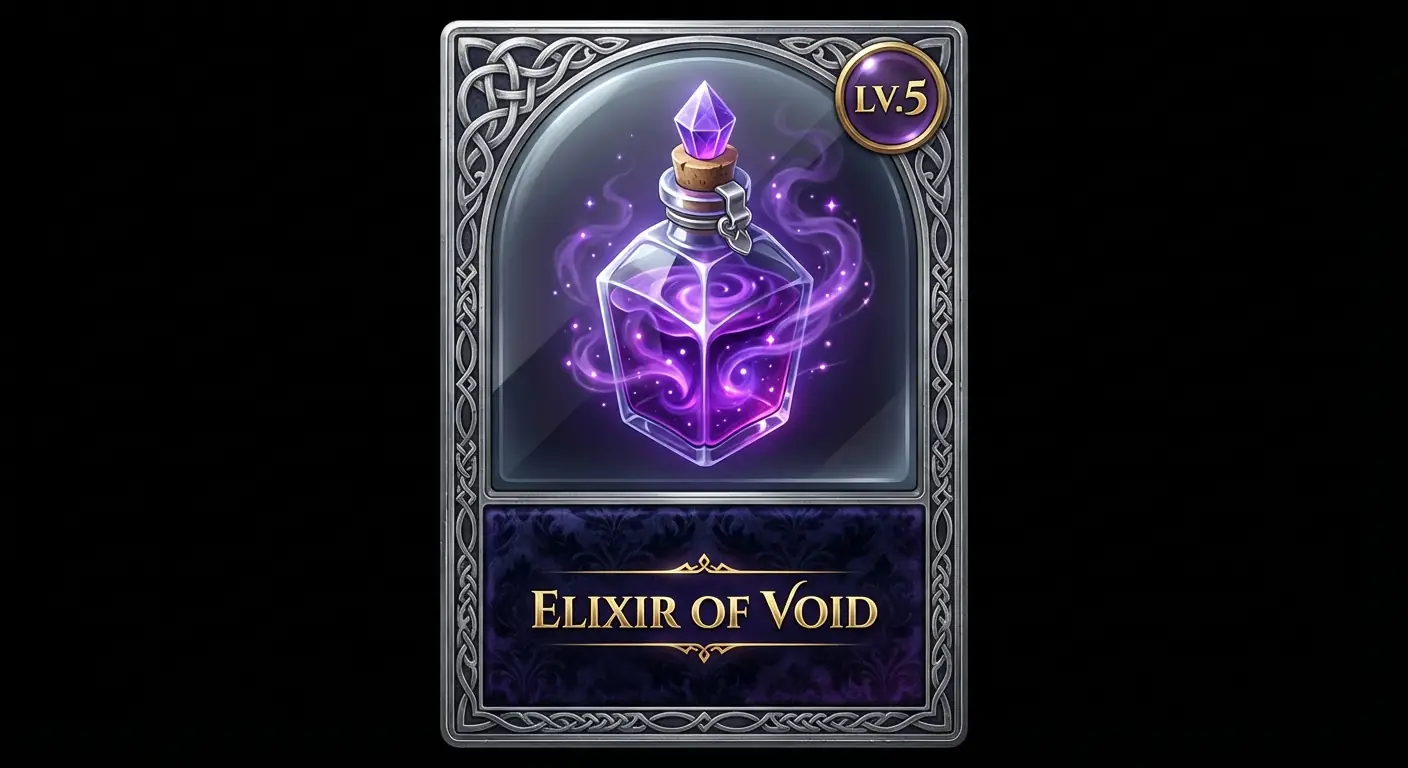
Prompt (JSON Format):
{
  "Task": "Design a complete digital asset for a RPG Item Card",
  "Object_Definition": {
    "Type": "Vertical Item Card",
    "Background": "Solid Black (for masking)"
  },
  "Layout_Structure": {
    "Border": "Silver metallic frame with celtic knots",
    "Art_Window": "Arched window occupying top 70%",
    "Text_Area": "Dark velvet panel at bottom"
  },
  "Content_Illustration": {
    "Subject": "A potion bottle filled with glowing purple liquid",
    "Effect": "Sparkles and smoke swirling inside the glass",
    "Style": "Isometic 3D icon style, high gloss"
  },
  "Typography_Data": {
    "Title_Text": "ELIXIR OF VOID",
    "Title_Style": "Gold, Serif, Elegant",
    "Stat_Badge": "Small circle in top-right with text 'LV.5'"
  }
}
💡 Design Insight:
Using JSON brackets forces the model to separate the "UI Layer" from the "Illustration Layer." This is currently the method with the highest success rate for complex UI layouts.
4. Dark Art Nouveau Tarot Card
Scenario: Narrative games, Divination systems.
Key Technique: Full-art control, Gold foil texture simulation, Inset borders.
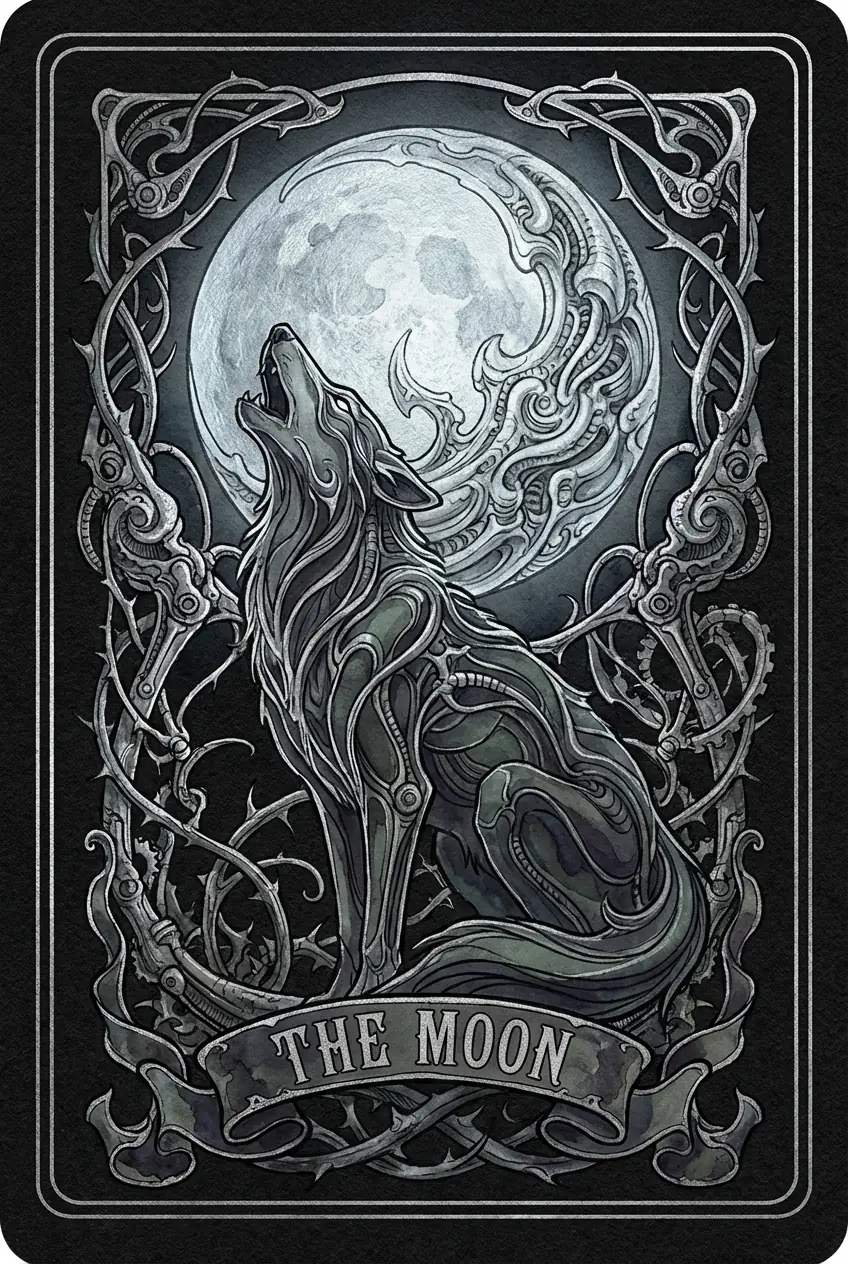
Prompt (Template):
Type: Generate a full-art Tarot card design titled "THE MOON".
Composition: The illustration covers the entire card surface. Add a delicate, thin silver line border inset 5mm from the edge (inset border).
Visuals: A mysterious wolf howling at a large pale moon, surrounded by twisted thorns.
Style: Alphonse Mucha mixed with H.R. Giger. Dark tones, intricate silver line work, flat colors, watercolor texture.
Text: At the bottom center, a decorative ribbon banner containing the text "THE MOON" in vintage capital letters.
Material: Simulate a silver foil print effect on textured black cardstock.
💡 Design Insight:
Keywords like "Full-art" and "Inset border" tell the AI not to generate heavy outer frames. Gemini's text rendering capability is used here to generate highly decorative titles.
5. Retro Pixel Art Character Card
Scenario: Indie games, GBA-style nostalgic games.
Key Technique: Style locking, Resolution simulation.

Prompt (Template):
Style: 16-bit pixel art style, SNES game asset.
Layout: A character profile card with a chunky grey stone border.
Character: A pixel art "Pixel Knight" with iron armor and a blue cape, standing in a dungeon.
UI Elements:
*   Bottom text box with blue background.
*   Text: "KNIGHT" in white pixelated font.
*   HP Bar: A red bar icon on the left side of the frame.
Resolution: Keep details sharp and blocky, no anti-aliasing.
💡 Design Insight:
Although Gemini excels at HD, specifying "Pixelated font" and "16-bit" allows it to accurately generate retro UI. Note the "No anti-aliasing" request to keep pixel edges sharp.
6. Post-Apocalyptic Vehicle Card
Scenario: Wasteland survival, Vehicle combat games.
Key Technique: Variable Injection — keeping the UI constant while only replacing the subject.

Prompt (Template):
Product View: A collectible trading card on a dirty metal table.
Card Frame: Rusted iron plates bolted together, industrial hazard stripes (yellow/black) on the edges.
Main Image: A modified muscle car with spikes and armor plating, driving through a desert dust storm. Mad Max style.
Data Layer:
*   Top Label: Stenciled text "INTERCEPTOR" in white spray paint style.
*   Stats: A gear icon in the bottom right corner with the number "88".
Consistency: Strong separation between the rusty frame and the painted illustration.
💡 Design Insight:
This template is suitable for "mass production." In a real workflow, you can keep the Card Frame description unchanged and only modify the vehicle description in Main Image to generate a consistent set of cards.
7. Minimalist UI Skill Card
Scenario: Modern mobile games, Flat UI design.
Key Technique: Vector style, Negative space usage, CSS code assistance.

Prompt (Template):
Design: A flat vector art skill card for a mobile game.
Shape: Rounded rectangle card with a soft shadow. Background color is solid pastel blue.
Icon: A simple white vector icon of a "Lightning Bolt" in the center.
Typography: Clean, Sans-Serif bold text "THUNDER" at the bottom center.
Detail: No texture, clean lines, flat colors, Dribbble UI style.
Instruction: Leave the top area empty for potential status icons.
💡 Design Insight:
For modern UI, use "Flat Vector" and "No texture" to remove the AI's default "painted" look. If extremely precise layout is needed, leverage Gemini's code generation to have it write CSS overlays directly.
III. Advanced Workflow: The Final Step from Generation to Implementation
1. Inpainting & Correction
If a generated card spells "Dragon" as "Draagon" or has an extra finger, do not regenerate.
Use Nanobanana's multi-turn conversation feature:
- Instruction: "Fix the typo in the title. Change 'Draagon' to 'Dragon'. Keep the font style exactly the same."
- Gemini will understand and redraw only the text area, keeping the rest of the perfect image intact.
2. Style Transfer
Midjourney v6 is still the king of art styles. The best workflow is:
- Generate Style Image with MJ: Get lighting and color references.
- Generate Structure with Nanobanana: Upload the MJ image as a reference (Reference Image) and combine it with the JSON prompts above to let Gemini "draw precise UI layouts in the style of MJ."
3. Post-Processing
It is recommended to always include "Isolate on solid black background" in your prompts. Although Gemini 3 Pro cannot yet perfectly generate alpha channels, a solid black background combined with Photoshop's "Screen" blend mode or Magic Wand tool is the best solution for extracting complex lighting UI effects (like holographic screens).
Conclusion:
With the logical reasoning capabilities of Nanobanana (Gemini 3 Pro), we are transforming card design from "lucky draws" to "controlled engineering production." By mastering the JSON templates and layering logic above, you can build high-quality game asset libraries 10x faster.
(This tutorial is based on Gemini 3 Pro model features; some advanced functions require Nanobanana Pro version)