How to Add Whimsical Line-Drawing People to Any Photo
Instantly transform your photos by adding minimalist, expressive line-art figures that interact with the environment.
Example Creations

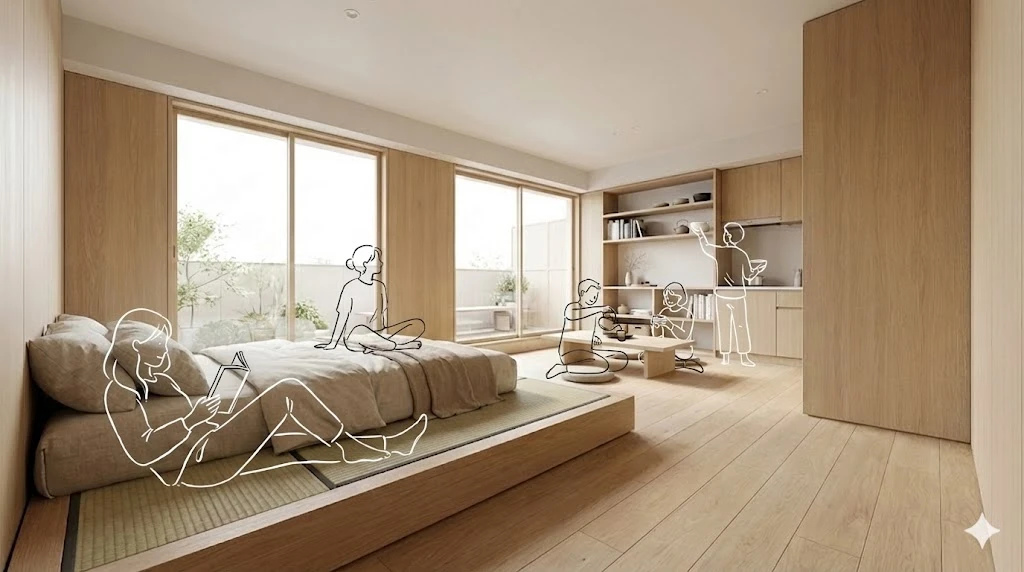
Two examples of photos enhanced with clean, white line-drawing illustrations of people interacting with the space.
This prompt allows you to breathe new life into any photograph by adding simple, elegant line drawings of people. The illustrated figures blend seamlessly into the scene, matching perspective and lighting to create a natural, whimsical feel. It's a perfect technique for architects, interior designers, and social media creators who want to add a human touch to their images without distracting from the main subject.
The "Living Sketch" Prompt
What This Prompt Achieves
This prompt instructs the AI to act as a digital illustrator, carefully integrating sketches into an existing photograph. Here’s the magic behind it:
- Context-Aware Illustrations: The AI analyzes the photo's perspective, lighting, and scale to ensure the drawings look like they belong in the scene.
- Meaningful Interaction: Figures aren't just placed randomly; they are drawn to interact with objects and spaces in a way that tells a story (e.g., sitting on a chair, leaning against a wall).
- Minimalist & Expressive Style: By requesting simple, fluid lines with no facial details, the focus remains on the environment while adding a touch of emotion and movement.
- Non-Destructive Addition: The prompt explicitly forbids obscuring original elements, ensuring the integrity of your original photo is maintained.
How to Use This Prompt
- Choose Your Base Photo: Select a photo of a space, such as an interior shot, architectural photo, or landscape. The prompt works best when there is room for figures to be added.
- Upload the Photo: In your AI tool (like Midjourney with image-to-text or Gemini Advanced), upload your chosen photograph.
- Copy and Paste the Prompt: Paste the complete "Living Sketch" prompt after your image upload.
- Generate and Refine: Let the AI work its magic. You can refine the prompt by adding specifics like "add a drawing of a person reading a book" or "two people talking near the window" to guide the composition.
Why It's a Great Technique
- Adds a Human Element: Show how a space can be used and felt without hiring models or using stock photos.
- Enhances Storytelling: The illustrated figures can convey a mood—be it calm, busy, or playful—that complements the story you want to tell.
- Modern & Trendy Aesthetic: This style is popular in architectural visualization, real estate marketing, and on social media platforms like Instagram and Pinterest.
- Highly Versatile: Works on a wide variety of photos, from cozy cafes and modern offices to expansive outdoor landscapes.
- Keeps Focus on the Subject: The minimalist style ensures the illustrated figures enhance, rather than overpower, the main subject of your photograph.
Pro Tips for Best Results
- Use High-Quality Photos: A clear, well-lit base photo will give the AI better information to work with for lighting and perspective.
- Specify the "Action": For more control, add a sentence describing what the illustrated people should be doing. For example, "Add a drawing of a child running across the lawn."
- Experiment with Color: While the prompt specifies "white" line drawings, you can experiment with other colors like "black," "warm yellow," or even "glowing blue" for different effects.
- Combine with Other Edits: Use this prompt as one step in a larger editing process. You could first adjust the photo's colors and then add the illustrations.