AI Black Friday Product Ad Prompts: 10 Campaign Ideas
AI Black Friday product ad prompts turn a product, a campaign placement, a lighting plan, and a clear copy area into a usable image brief. Start with the job the image must do: introduce a hero item, show a giftable bundle, open an email, or support a Cyber Monday follow-up. The ten prompts here use fictional, unbranded products to demonstrate those decisions. Keep genuine prices, dates, discounts, and product claims under your control by adding them in an editor after generation. For a real item, use an authorized product reference and inspect the output against it before advertising. A beautiful concept image does not establish accurate packaging, dimensions, materials, or performance.
By Nano Banana Studio · · Fictional product concepts
Start with the placement. A shop homepage, a gift guide, an email, and a retail display need different product scales and copy areas. Use these ten complete briefs to choose a direction, then add your real campaign information outside the image tool.
Plan Black Friday product photos around the offer
A single product on a dark background can look polished and still leave you nowhere to put a sale message. Start with the placement and the decision the shopper needs to make. A homepage image introduces a hero item. A collection banner shows a small range. A gift-guide tile suggests a useful combination. A detail image brings a finish or construction feature closer. Those jobs need different compositions.
These examples use original, unbranded products so you can study the image brief without borrowing a real retailer's identity. The images were created with GPT's built-in image tool; the tool did not provide a specific model-version name. The examples do not establish performance in Nano Banana or another named image model. Use the prompts as complete starting briefs and inspect your own results when you change them.
Keep one campaign palette across your small business Black Friday ad creatives, but do not force every channel to use the same crop. A burgundy backdrop can connect a portrait bundle, an email hero, and a retail display while each keeps its own product scale and copy area. For general branding and poster work, the product ads and posters workflow covers the wider task.
Use one complete brief at a time
- Choose the commercial job. Decide whether this is a hero, bundle, gift guide, detail image, or follow-up. Write down the genuine offer separately before choosing a visual treatment.
- Copy the full prompt. Each brief includes the subject, setting, style, composition, lighting, exclusions, and output. The object count and copy-space instructions are as important as the photographic style.
- Generate the concept in the image tool. Start a separate generation for each brief. Change one art-direction choice at a time so you can tell which instruction affected the result.
- Inspect the full image. Count the objects, follow every product edge, check the support surface, and read any generated words. Compare the actual empty area with the space your heading and button will need.
- Add and verify the offer. Set your real product name, dates, prices, discounts, and call to action in an editor. Then export a version for the actual placement and check it again at its final display size.
The free material here is the prompt text. Access to image generation and its limits depend on the tool you use. Keep a copy of the wording that produced the image you choose; a short note about what failed is often more useful than saving ten vaguely different versions of the same brief.
Choose a master composition before exporting
The landscape 3:2, portrait 2:3, and square 1:1 images below are production masters. They are starting compositions, not claims about a platform's preferred or best-performing size. Check your store theme, email template, and advertising placement before making the final export. A crop is useful only if it preserves the product, the offer area, and the intended visual hierarchy.
| Creative job | Master ratio | Start here when |
|---|---|---|
| 01. Single-product homepage hero | 3:2 | A small shop promoting one hero item on its homepage. |
| 02. Vertical skincare bundle creative | 2:3 | A beauty retailer preparing a portrait bundle announcement. |
| 03. Cozy-accessories gift-guide tile | 1:1 | An accessories seller assembling a seasonal gift-guide tile. |
| 04. Leather-accessories collection banner | 3:2 | A leather-goods shop introducing a category collection. |
| 05. Sale-opening teaser with editable countdown space | 1:1 | A gift shop announcing when its seasonal sale will open. |
| 06. Product display with a blank offer card | 2:3 | A homeware shop preparing a simple retail display. |
| 07. Jewelry-detail retargeting creative | 1:1 | A jewelry shop creating a detail-focused follow-up ad. |
| 08. Homeware lifestyle campaign scene | 3:2 | A textile seller showing a product in a room setting. |
| 09. Cyber Monday desktop-accessory banner | 3:2 | A desktop-accessories shop preparing a Cyber Monday follow-up. |
| 10. Pottery gift-packaging reveal | 1:1 | Gift-packaging campaign tile; square master |
Build AI sale banner prompts with usable copy space
Describe the quiet area as part of the physical scene: an even wall, unbroken felt, or a blank card. State which objects belong outside it. A pedestal, ribbon, reflection, or long spout can invade the layout even when the main product is correctly positioned. If you reverse the copy side, reverse the product and support instructions together.
Adapt a master for Black Friday email hero images
For email, adapt a displayed concept with a simple silhouette and enough quiet space for your particular template. Keep the email's actual heading and button as live text so the message remains available when images do not load. Export a separate version and inspect the product edge, copy area, and heading together in the real email column. This is an adaptation step, rather than a claim that a master already fits every email header.
Copy, generate, inspect
Ten Black Friday campaign image prompts
Pick the closest job, copy its complete brief, and use the inspection points beneath it. Each example has its own product scene. A suggested repair changes the prompt for a new generation; it does not describe an invisible correction already made to the displayed image.
Single-product homepage hero
A small shop promoting one hero item on its homepage.
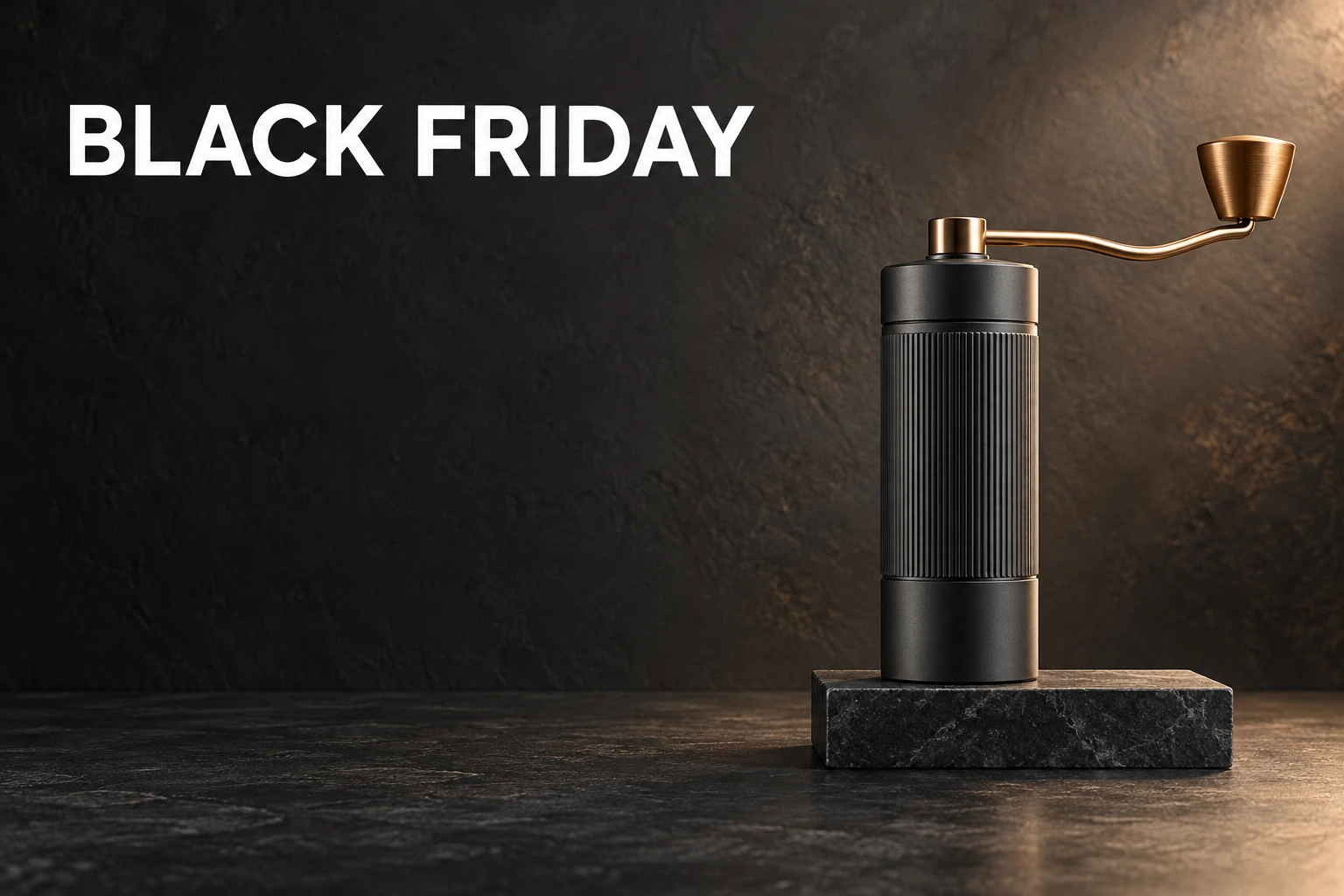
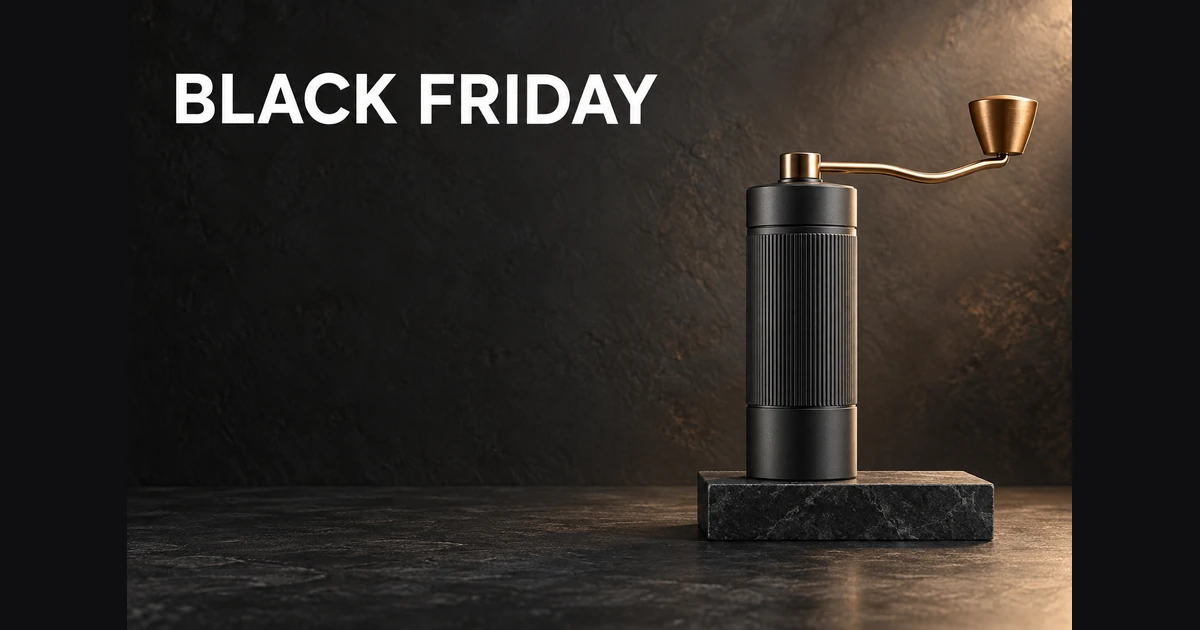
Keep the product unmistakable and reserve the lower-left area for the genuine offer. The support block needs a boundary as well as the grinder; otherwise a convincing product can still produce an unusable banner.
Task: Create a Black Friday product advertising hero image for a fictional home-coffee accessories shop.
Subject: Exactly one unbranded matte-charcoal manual coffee grinder with a slim brass crank and a ribbed cylindrical body, standing upright on a low rectangular black stone plinth.
Context: A small retailer needs an original campaign concept for its homepage; this is a fictional product, not a depiction of an existing branded item.
Style: Photoreal commercial still-life photography, restrained premium art direction, tactile stone and powder-coated metal, charcoal with one warm copper accent.
Composition: One landscape 3:2 frame at product-eye level. Keep the grinder and its narrow plinth entirely within the rightmost 40 percent, with generous clear margins around the crank. The plinth is only slightly wider than the grinder body; its left edge starts at 65 percent of the image width, and it ends before the right edge. Leave the left 60 percent of the foreground completely free of objects. The left half is a smooth dark wall. Place the exact two-word headline "BLACK FRIDAY" once in the upper-left in crisp, large, plain white sans-serif letters; keep the lower-left completely empty for a later offer and button.
Lighting: A large softbox from the upper right creates a thin rim on the grinder, a believable contact shadow beneath the plinth, and readable detail in the dark body; subtle warm fill, no blown metal highlights.
Constraints: Exactly one grinder, one plinth, no other products, no people, no confetti, no logos, no prices, no percentage signs, no watermarks. The only visible writing is "BLACK FRIDAY"; no text on the product. Keep the silhouette plausible and the entire product sharp.
Output: One finished landscape 3:2 image, approximately 1536 by 1024 pixels or the closest supported native size. One continuous scene, not a collage, grid, comparison, mock browser or device frame.
- Exactly one plausible grinder with complete visible crank and one grounded plinth.
- Product stays on right; lower-left offer area remains genuinely empty.
- BLACK FRIDAY is spelled correctly, appears once, and is the only writing.
- Metal, stone, shadows and product silhouette show no obvious generated artifacts.
Adjust the brief
- Product
- Replace with one owned or fictional hero product; preserve count and right-hand placement.
- Palette
- charcoal/copper; navy/silver; cream/brick
- Copy space
- lower-left; reverse all placement instructions for right-side copy
If the image misses the brief
If lettering fails, remove the headline from a revised prompt and create a clearly labeled text-free concept; add the real campaign wording in an editor. Record the exact revised prompt and regenerate, rather than calling an unreadable result a pass.
Vertical skincare bundle creative
A beauty retailer preparing a portrait bundle announcement.
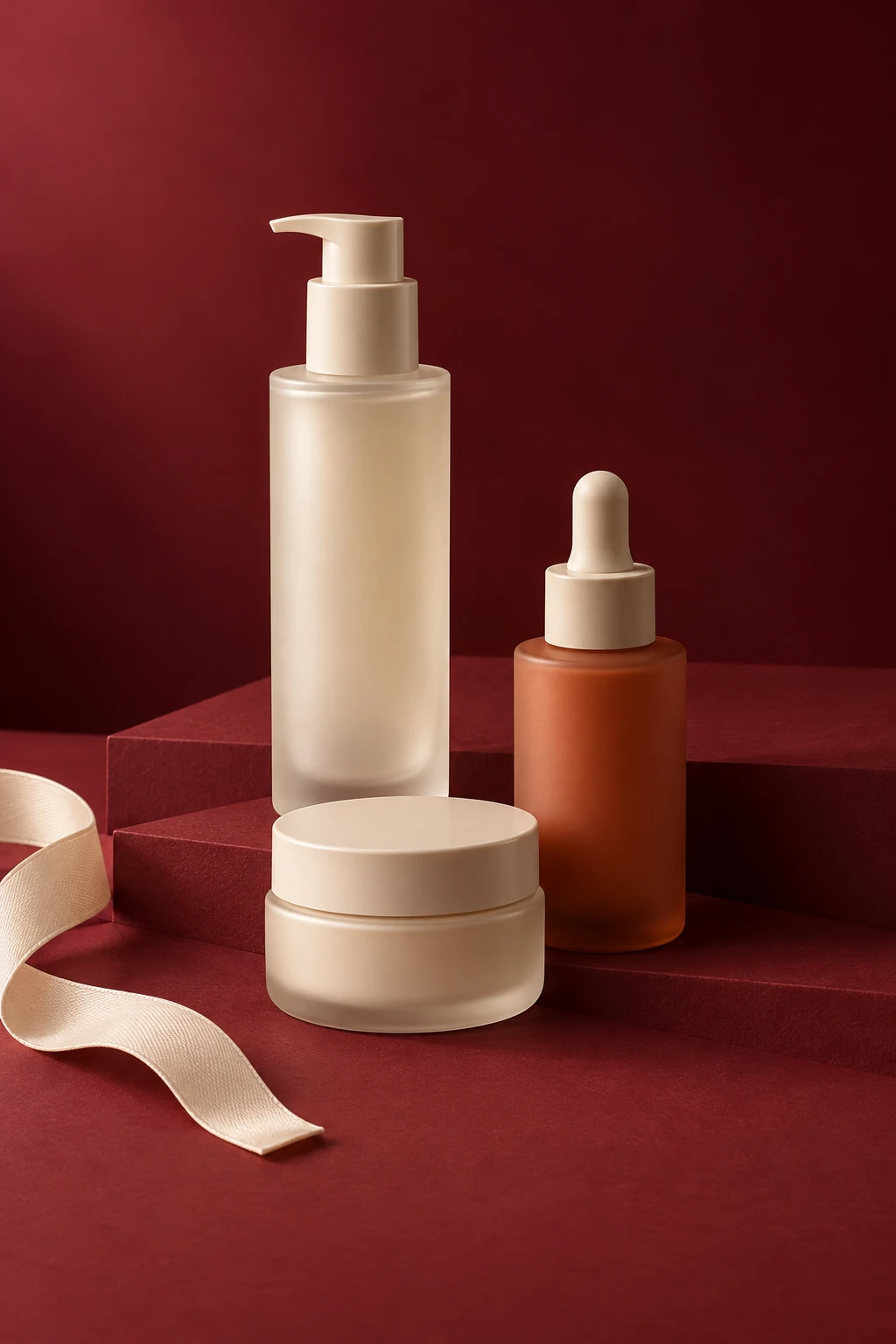
The three container types make the bundle easy to read without labels. Add the actual bundle contents and offer outside the image, and keep the ribbon beside the products so it does not obscure a closure or silhouette.
Task: Generate a vertical Black Friday skincare-bundle advertising concept for a fictional independent skincare shop.
Subject: Exactly three unbranded containers: one tall frosted-ivory pump bottle, one medium terracotta dropper bottle, and one low ivory cream jar with its lid closed. All three stand separately on a folded deep-burgundy paper stage.
Context: The retailer needs a portrait campaign image to announce a bundle offer; the actual product names, price and offer will be added later by the shop.
Style: Photoreal beauty advertising, modern editorial still life, matte paper, gently translucent glass and natural-looking ceramic surfaces, warm ivory and burgundy palette.
Composition: A single portrait 2:3 scene viewed slightly above product height. Arrange the three products as a compact stepped triangle in the middle-to-lower half, tallest at the back, each silhouette fully visible and all bases resting on the stage. Keep the top quarter as a plain burgundy gradient and the bottom 12 percent clear for later typography. A loose ivory ribbon enters from the lower-left edge and stops beside the stage; it never crosses a container.
Lighting: A broad diffused window light from camera left, soft shadow falloff to the right, a faint edge highlight on the frosted bottle, controlled highlights with no glossy glare obscuring the shapes.
Constraints: Exactly one pump bottle, one dropper bottle and one closed jar, with no duplicates or extra lids. No words, letters, numbers, labels, logos, fake seals, medical claims, price tags, people, hands or watermark. No floating products, fused packaging or ribbon wrapped through an object.
Output: One clean portrait 2:3 image, approximately 1024 by 1536 pixels or the closest supported native size. A single campaign scene, not a collage, contact sheet, phone mockup or finished platform screenshot.
- Exactly three separate containers with one pump, one dropper and one closed jar.
- All containers grounded; neither paper nor ribbon cuts through a product.
- Top-quarter and bottom strip provide usable quiet copy areas.
- No writing, logos, fake claims or unreadable labels anywhere.
Adjust the brief
- Bundle
- Keep three distinct container types; change only materials or colors.
- Stage
- folded matte paper; shallow solid-color riser
- Palette
- burgundy/ivory; navy/sand; forest/cream
If the image misses the brief
If the model duplicates bottles, simplify to one row of three containers with explicit left/center/right positions and regenerate the same prompt ID. Do not crop away an extra product and claim the original count instruction passed.
Cozy-accessories gift-guide tile
An accessories seller assembling a seasonal gift-guide tile.
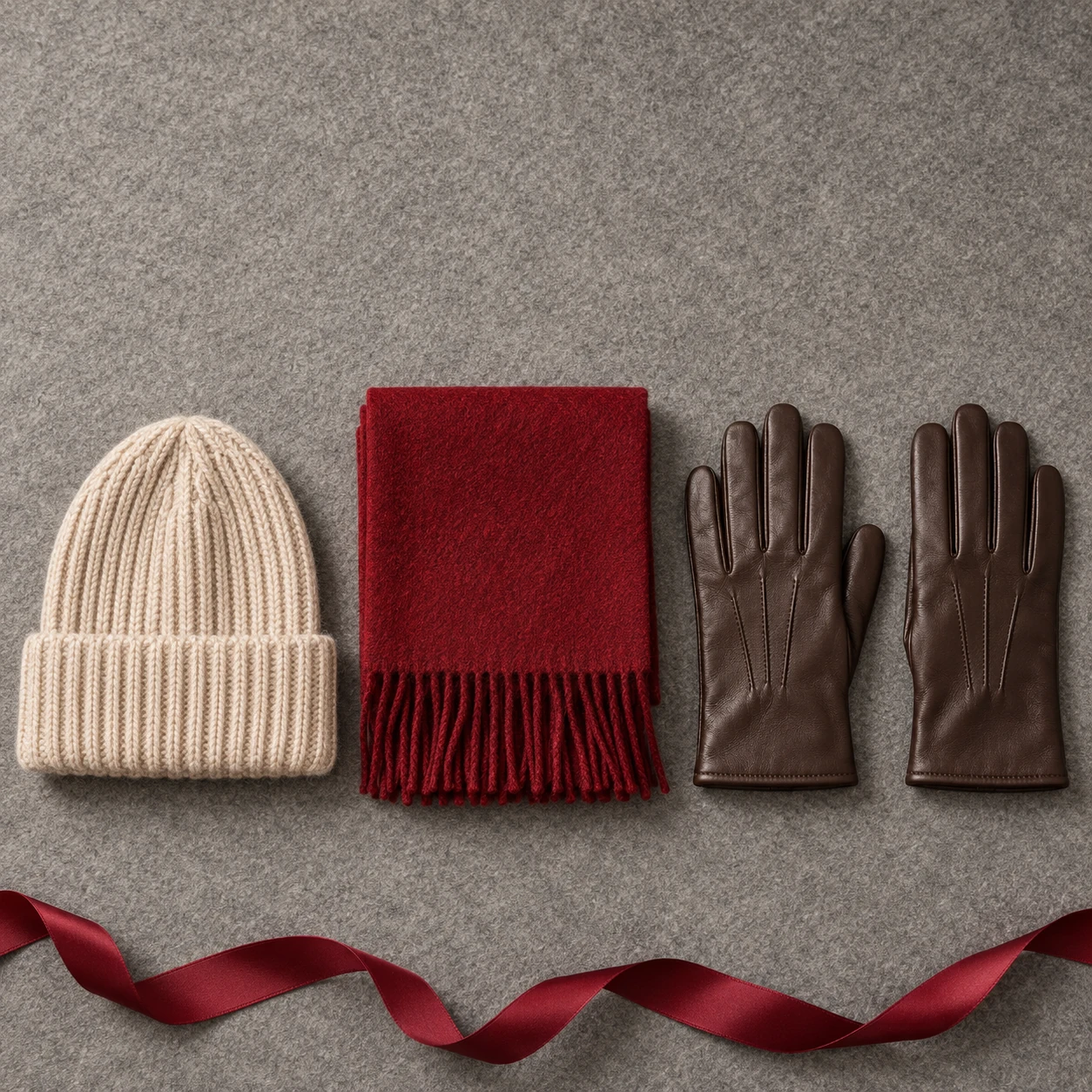
A gift-guide image needs an assortment that reads as a group while retaining each item's outline. The two gloves count as two physical objects. Leave enough surface between them to inspect their fingers and edges.
Task: Create a square Black Friday gift-guide product photograph for a fictional winter-accessories shop.
Subject: Exactly one oatmeal rib-knit beanie, one neatly folded deep-red wool scarf, and one pair of dark-brown leather gloves laid flat together on a warm gray felt surface.
Context: This is an original styling concept for a retailer assembling a gift-guide tile; gift pricing and campaign wording will be added outside the image.
Style: Photoreal overhead editorial product photography, quiet seasonal warmth, visible wool fibers and leather grain, simple geometric arrangement.
Composition: Use one square overhead frame. Arrange four fully separate, non-overlapping objects in a single horizontal row across the lower two-thirds: the beanie at far left, the compact folded scarf next, the left glove next, and the right glove at far right. Leave a visible strip of gray felt between every item; the gloves must not overlap each other or touch the scarf. Keep every finger and every outer edge fully visible. Keep the entire top quarter as unbroken gray felt for a later headline. Add one short loose length of burgundy ribbon along the bottom edge, outside the products.
Lighting: A very large soft source from the upper left produces gentle shadows to the lower right, clear stitching and realistic fabric thickness, with no hard glare on the gloves.
Constraints: Exactly one beanie, one scarf and exactly two gloves. No extra accessories, hands, heads, mannequins, gift tags, labels, words, numbers, logos or watermark. Do not merge glove fingers or let the scarf dissolve into the background. All objects lie on the same real surface.
Output: One square 1:1 product image, approximately 1024 by 1024 pixels or the closest supported native size. Single continuous photograph, not a grid, mood board or multiple panels.
- One beanie, one scarf and two gloves, with plausible glove fingers.
- Top quarter is quiet and available for editorial copy.
- Fabric edges, stitches, contact shadows and leather remain believable.
- No text, price, brand or invented gift threshold.
Adjust the brief
- Assortment
- Three complementary owned or fictional accessories
- Surface
- felt; unpatterned linen; matte paper
- Copy space
- top quarter
If the image misses the brief
If glove anatomy fails, replace the pair with one neatly folded belt in a revised prompt and regenerate this ID; update the card title, exact prompt and acceptance criteria together.
Leather-accessories collection banner
A leather-goods shop introducing a category collection.
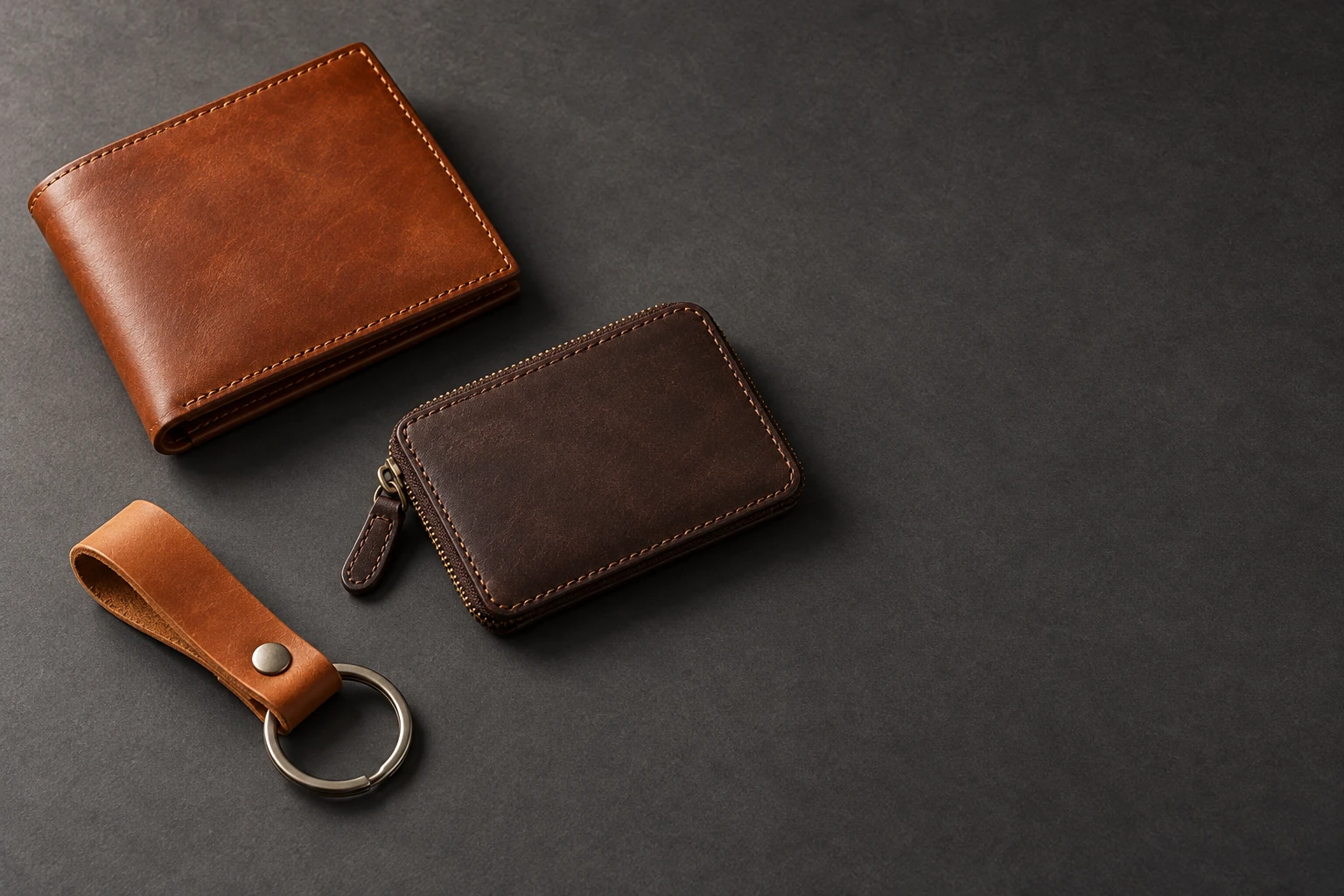
Use a small assortment rather than a catalog full of tiny objects. The empty side can carry a category-wide message while the photograph communicates material and range. Keep the seams and closures simple enough to inspect.
Task: Create a Black Friday category-sale banner concept for a fictional small leather-goods shop.
Subject: Exactly one cognac bifold wallet closed, one dark-brown zip cardholder closed, and one simple tan leather key fob with one empty silver split ring.
Context: The image will introduce an accessories collection on a shop website. It should communicate material and variety while leaving the real collection offer editable.
Style: Photoreal crafted-goods advertising, understated workshop quality, warm leather against cool charcoal paper, no recognizable brand design.
Composition: A single landscape 3:2 scene at a 35-degree downward camera angle. Arrange the wallet, cardholder and key fob in a loose diagonal in the leftmost 50 percent, with generous separation. Keep the rightmost 40 percent as clean, even charcoal paper with no objects for a headline and call to action. The objects occupy the same continuous tabletop, without borders or product-card boxes.
Lighting: Soft side light from the upper left reveals the leather pores and restrained stitching; a broad weak fill preserves detail in the dark cardholder. Contact shadows fall consistently toward the lower right.
Constraints: Exactly three leather objects and exactly one metal split ring attached to the fob. No keys, coins, cards, open compartments, price tags, text, letters, logos, watermarks or hands. Preserve simple plausible seams and closures. No floating objects or impossible leather folds.
Output: One landscape 3:2 image, approximately 1536 by 1024 pixels or the closest supported native size. Single still-life scene, not a collage or browser mockup.
- Three distinct leather products and one attached ring; no extra objects.
- Rightmost 40 percent is visually quiet.
- Seams, zippers and contact shadows are coherent.
- No price tags, counterfeit branding or text.
Adjust the brief
- Category
- Use a small coherent assortment with explicit object count
- Surface
- charcoal paper; slate-gray fabric
- Layout
- left-side assortment with right-side copy
If the image misses the brief
If objects merge, specify separate left-to-right positions with visible tabletop between every item and regenerate; retain the same copy-space side.
Sale-opening teaser with editable countdown space
A gift shop announcing when its seasonal sale will open.

The unopened box creates a simple teaser without inventing a countdown. Add the verified opening time in your layout. A restrained beam of light is easier to combine with readable type than confetti, smoke, or a generated clock.
Task: Create a Black Friday sale-opening teaser image for a fictional independent gift shop.
Subject: Exactly one closed matte-black rectangular gift box tied with one wide burgundy satin ribbon, with a simple neat bow.
Context: The shop is preparing a countdown announcement before its sale opens. The actual launch date, time and countdown numbers will be added separately; the image itself makes no time or discount claim.
Style: Photoreal campaign still life, theatrical but restrained, tactile paper and fabric, rich black and burgundy with a thin warm highlight.
Composition: One square frame, camera slightly above box height. Make the closed gift box, ribbon and bow a small arrangement entirely within the bottom-left 45 percent of the frame. The highest loop of the bow stays below the horizontal midpoint. Place it on a low dark podium that also remains below the midpoint. Keep the whole upper half and rightmost third free of objects, as a smooth dark background with abundant clear space for the future countdown. One soft diagonal beam on the background suggests an approaching reveal without forming symbols or numerals.
Lighting: Controlled soft spotlight from the upper left, gentle edge light on the box and ribbon, a visible grounding shadow under the box, restrained reflected light on the podium.
Constraints: Exactly one closed box and one ribbon bow. No clock, calendar, numbers, words, sale sticker, gift tag, fireworks, confetti, smoke, people, logos or watermark. No visible contents, floating lid or impossible ribbon crossing through the box.
Output: One square 1:1 image, approximately 1024 by 1024 pixels or the closest supported native size. A single atmospheric scene, not a countdown interface, animation strip or collage.
- One closed box and physically plausible ribbon.
- Upper half and right third remain clear and dark enough for overlay.
- No invented time, price or discount.
- Box and podium have coherent contact and perspective.
Adjust the brief
- Box color
- black; charcoal; deep navy
- Ribbon
- burgundy; copper; ivory
- Countdown
- Add verified date and time externally
If the image misses the brief
If the bow is tangled or fused, simplify the ribbon to one clean flat band with no bow in the revised prompt and regenerate. Keep that revision visible in the published prompt.
Product display with a blank offer card
A homeware shop preparing a simple retail display.
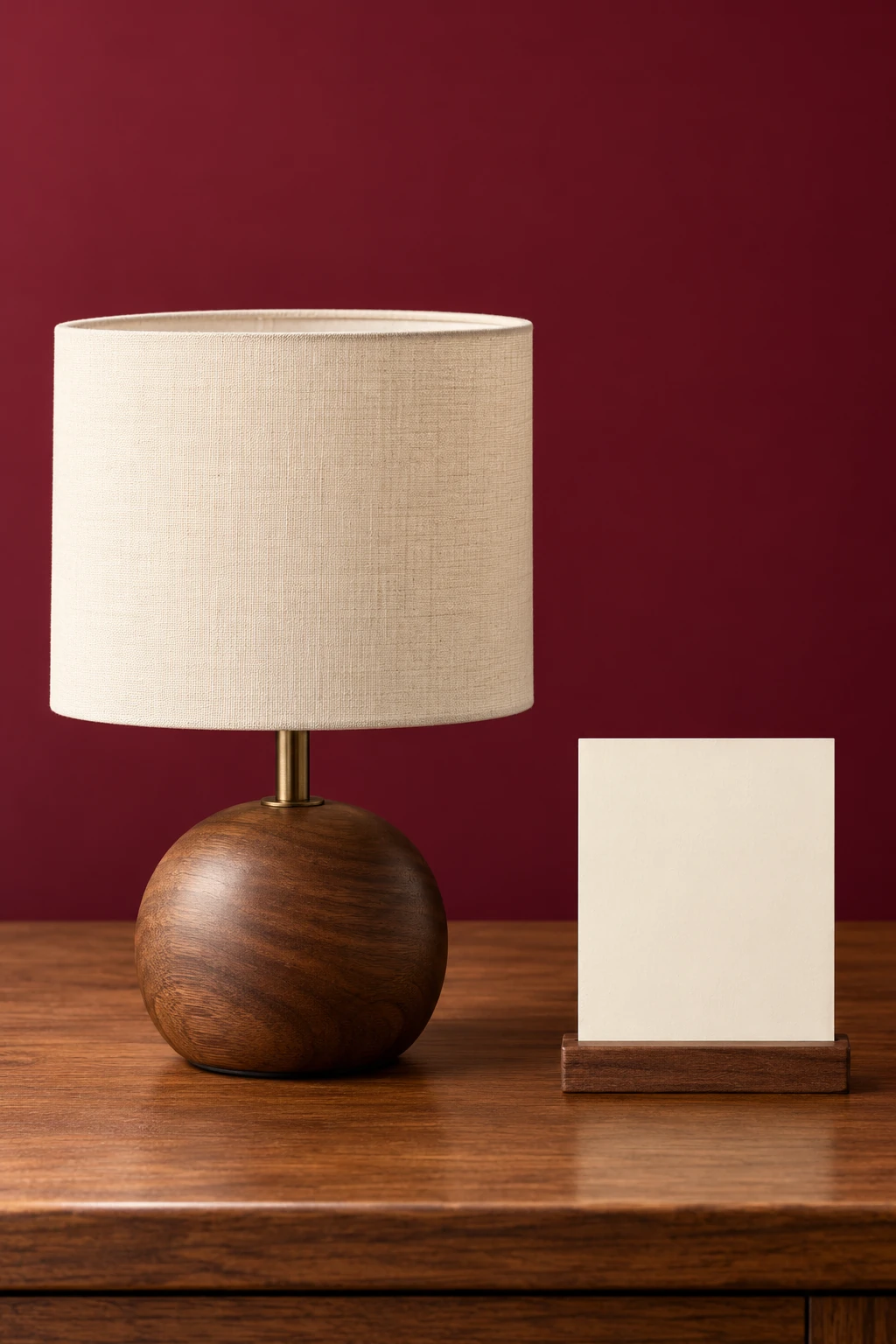
Treat the card as an empty surface for your own typography. Its front should face the camera closely enough to accept a product name or offer later. Keep it separate from the lamp so neither object hides the other.
Task: Create a portrait Black Friday retail-display image with a blank offer card for a fictional homeware shop.
Subject: Exactly one small table lamp with a simple round walnut base, a straight short stem and an ivory fabric drum shade; exactly one blank rectangular cream card standing in a narrow wooden holder beside it.
Context: The retailer will place its genuine product name and offer on the card after generation. This is a concept image for a small seasonal retail display.
Style: Photoreal warm contemporary homeware advertising, simple honest materials, ivory fabric, walnut grain and a burgundy paper backdrop.
Composition: Use one portrait 2:3 frame at tabletop eye level. Place the lamp on the left half and the smaller upright card on the lower-right, with space between them and no overlap. Turn the front of the card almost square to the camera so its blank face is easy to typeset later. Keep the top quarter a smooth burgundy background with no objects. Show the full lamp base and shade.
Lighting: The lamp is switched off. Illuminate the set with a large softbox from camera left and a gentle fill from the right, giving the blank card even light and preserving the shade fabric texture.
Constraints: Exactly one lamp, one blank card and one card holder. No writing, numbers, logo, watermark, fake certification, discount sticker, extra lamp, visible electrical outlet, people or hands. Keep the shade circular in perspective, the lamp upright and all items grounded.
Output: One portrait 2:3 photograph, approximately 1024 by 1536 pixels or the closest supported native size. One scene without an inset, comparison panel, retail-screen mockup or collage.
- One complete lamp and one separate, truly blank card.
- Card face is readable as a clean plane, without generated glyphs.
- Top quarter remains clear; all product edges are within frame.
- Lamp is off; lighting and contact shadows agree.
Adjust the brief
- Display item
- One simple owned or fictional homeware item
- Card
- blank cream; blank white
- Background
- burgundy; charcoal
If the image misses the brief
If the card gains fake text, explicitly describe a completely unprinted smooth rectangle, remove any mention of price from the revised prompt, and regenerate before manual typography.
Jewelry-detail retargeting creative
A jewelry shop creating a detail-focused follow-up ad.
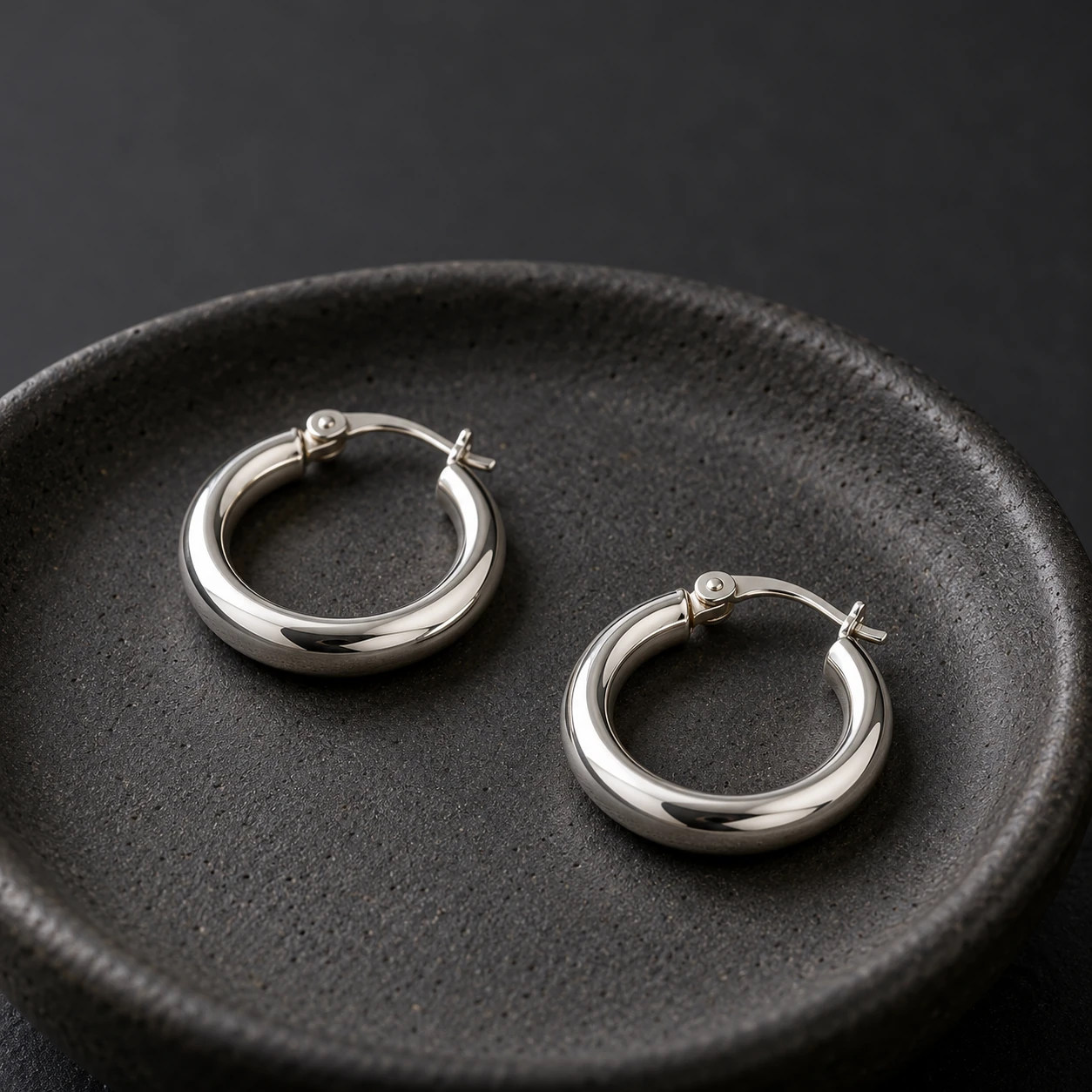
A close-up can show finish and shape without an elaborate setting. Both hoops must remain complete and distinct. This is a fictional design study, so it does not establish a real item's metal purity, dimensions, or clasp accuracy.
Task: Generate a close-up Black Friday jewelry advertising concept for a fictional handmade-jewelry shop.
Subject: Exactly one pair of small polished-silver hoop earrings, two matching circular hoops with simple hinged clasps, resting separately on a shallow matte-charcoal ceramic dish.
Context: The shop needs a product-detail creative for people who have already seen its collection. The photograph demonstrates finish and shape; the actual product specifications and offer are added later.
Style: Photoreal macro product photography, understated handmade luxury, natural silver reflections against a dark tactile ceramic surface.
Composition: One square close-up at a gentle 45-degree angle. Place the dish and both earrings in the lower two-thirds, with each hoop complete and a clear gap between them. Keep the upper quarter a smoothly defocused charcoal background for a short later headline. Use enough depth of field that both earrings and both clasps remain legible as solid forms.
Lighting: Two broad diffused reflectors create soft controlled bands of light on the silver, with a weak fill to retain the inner curves and small contact shadows. No starbursts or sharp sparkle effects.
Constraints: Exactly two earrings and one dish. No gemstones, extra clasps, chains, fingers, ears, people, lettering, stamped brand marks, price tags, logos or watermark. Do not merge the hoops or invent metal bridges between them. No claims about metal purity or allergies appear in the image.
Output: One square 1:1 image, approximately 1024 by 1024 pixels or the closest supported native size. A single macro photograph, not multiple angles, a comparison or a jewelry catalog grid.
- Exactly two separate complete hoops with plausible simple closures.
- Both earrings are sharp enough to inspect, with controlled metal reflections.
- Upper quarter stays available for overlay.
- No extra jewelry, invented hallmarks or claims.
Adjust the brief
- Material look
- silver-tone; warm brass-tone, without purity claims
- Dish
- matte charcoal; matte ivory
- Headline
- Add verified campaign copy separately
If the image misses the brief
If closures become malformed, use two simple seamless hoop forms in a revised concept and label the result as a concept; do not claim faithful reproduction of a real clasp.
Homeware lifestyle campaign scene
A textile seller showing a product in a room setting.
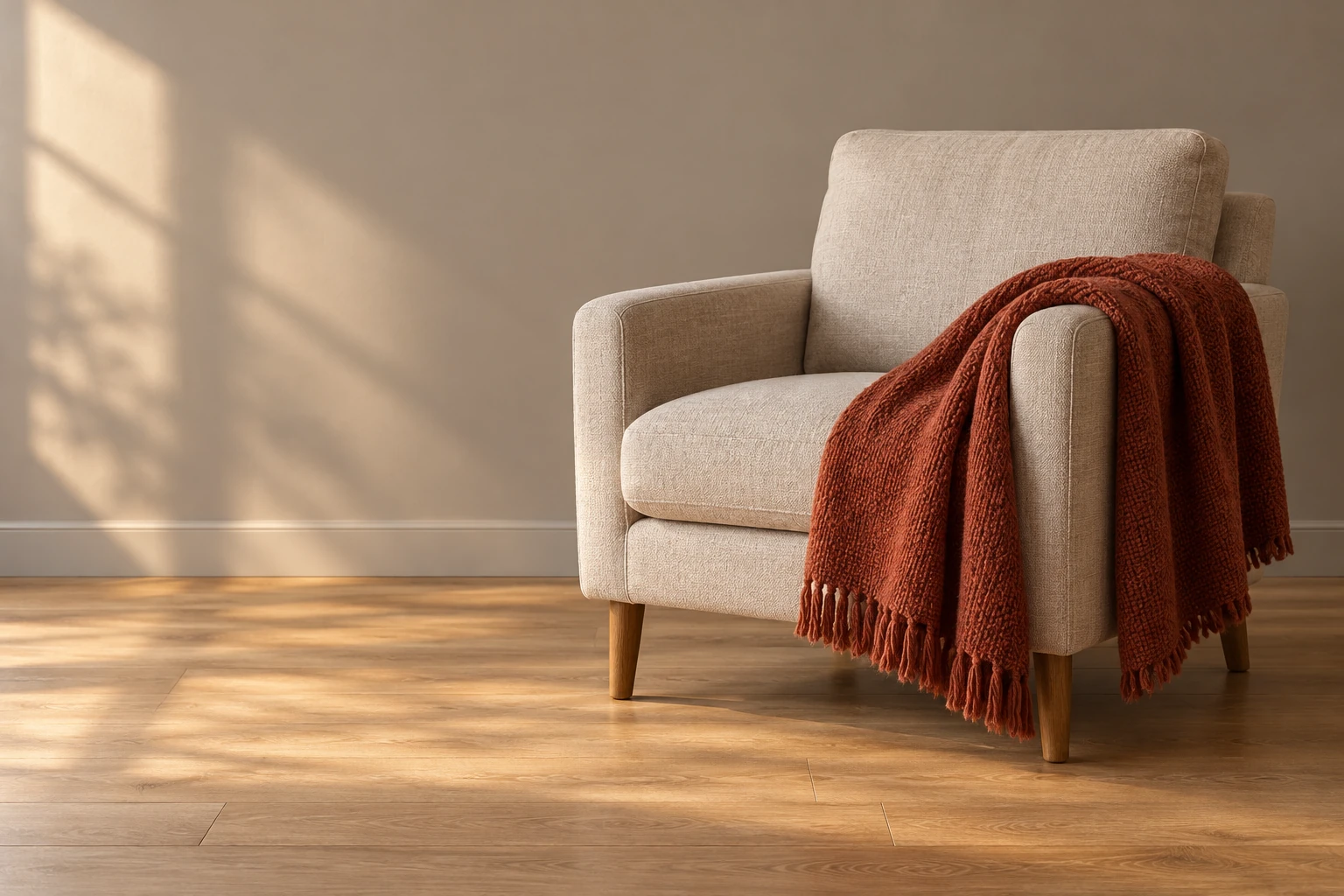
Let the room explain the use while the textile remains the hero. One chair, one throw, and a quiet wall create a more manageable composition than a fully decorated interior. Inspect the fabric as a single continuous piece.
Task: Create a Black Friday homeware lifestyle advertising scene for a fictional small textile shop.
Subject: Exactly one deep-rust woven cotton throw blanket, neatly draped over the arm of one simple oatmeal upholstered armchair, with its short fringe visible and its weave clearly readable.
Context: A retailer needs a warm room-setting concept for a seasonal textile collection. The throw is the product hero; the room is styling context, and the shop will add real offer copy separately.
Style: Photoreal interiors editorial photography, calm lived-in warmth, restrained autumn color palette, simple contemporary furniture with no recognizable designer silhouette.
Composition: One landscape 3:2 frame viewed from a natural seated eye height. Use a wider camera view so the complete armchair and the entire draped throw fit inside the rightmost 55 percent. Leave a clear strip of wall or floor around every outer edge of the chair, including its back, both arms and all visible legs; neither furniture nor blanket touches or crosses the image border. The full chair occupies no more than half of the frame width. Keep the left 40 percent as a plain warm-gray wall above a clean oak floor, with no furniture or ornaments in that copy area. Show the blanket as one continuous rectangle following the chair arm naturally, not floating or spread like a second chair.
Lighting: Late-afternoon diffuse window light from outside the left edge, soft warm highlights on the weave, consistent gentle shadows under the chair, moderate depth of field with the textile sharp.
Constraints: Exactly one chair and one throw, no extra blanket, cushions, people, pets, plants, fireplaces, candles, wall art, text, numbers, labels, logos or watermark. Avoid warped chair legs, repeated fringe, floating fabric or impossible folds.
Output: One landscape 3:2 photograph, approximately 1536 by 1024 pixels or the closest supported native size. One room scene, not a before-and-after, catalog grid or multiple panels.
- One chair and one visibly continuous throw with coherent folds.
- Left side remains clear for copy.
- Textile texture and fringe are plausible; chair geometry is intact.
- No unrequested people, props, writing or claims.
Adjust the brief
- Throw
- A single owned or fictional textile in one solid color
- Room palette
- oatmeal/rust; charcoal/cream
- Copy side
- left, or reverse the composition consistently
If the image misses the brief
If blanket edges duplicate, reduce the drape to one visible fold over a straight arm and regenerate; keep the textile count at one.
Cyber Monday desktop-accessory banner
A desktop-accessories shop preparing a Cyber Monday follow-up.
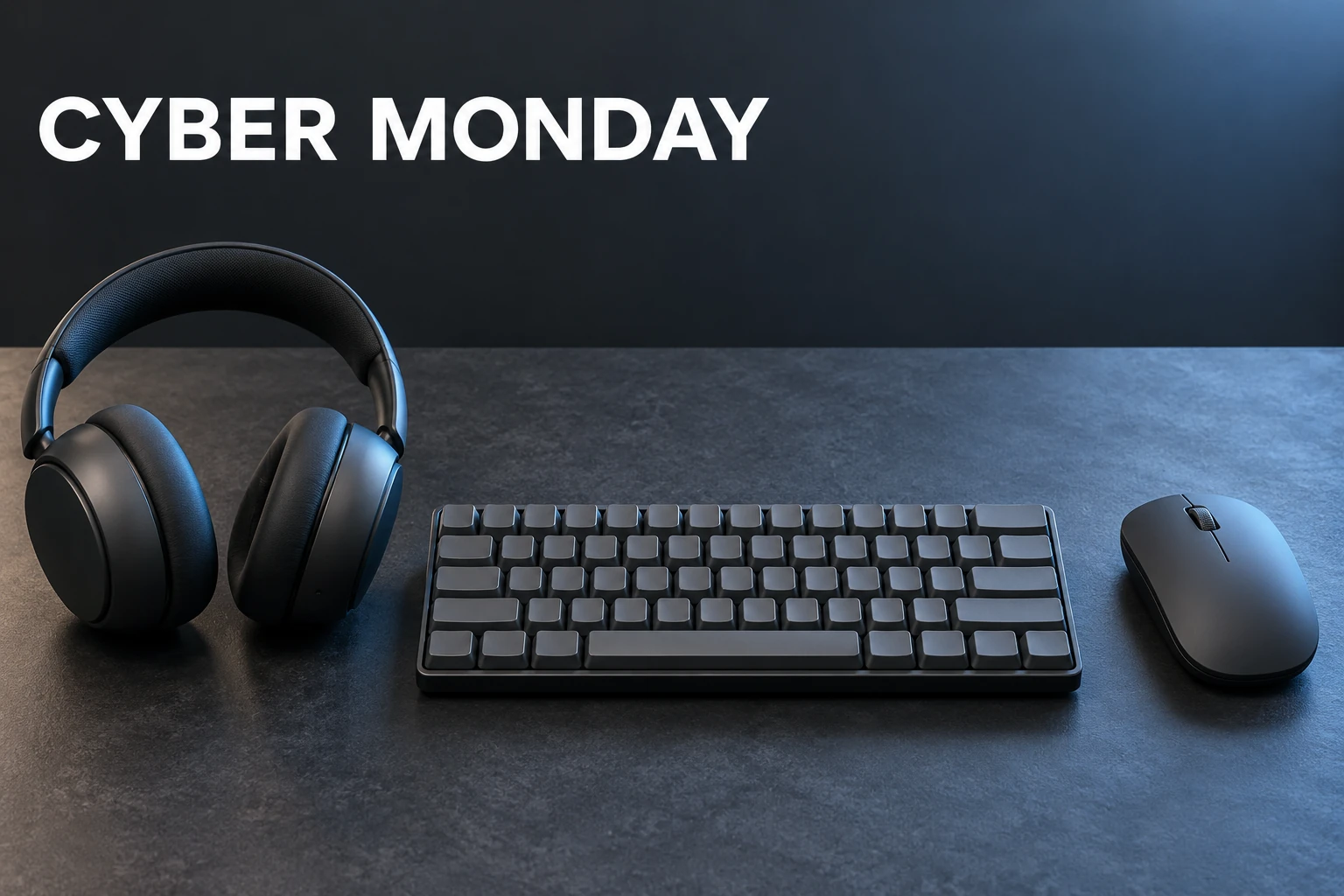
A cool-toned desktop arrangement gives the follow-up its own direction. Keep the three accessories separate and reserve the upper-right for editable offer copy. Blank keys avoid asking the generator to invent a keyboard's lettering.
Task: Create a Cyber Monday product-advertising banner concept for a fictional desktop-accessories shop.
Subject: Exactly one compact unbranded wireless keyboard with plain blank keycaps, one simple wireless mouse, and one pair of over-ear headphones with a single continuous headband.
Context: The retailer needs a follow-up creative after Black Friday. This is an original concept for a three-product desktop collection, with actual offer details to be added later.
Style: Photoreal technology advertising, clean satin surfaces, cool graphite and muted ice-blue lighting, disciplined modern still-life art direction.
Composition: Use one landscape 3:2 frame, camera at a 40-degree downward angle. Arrange the keyboard horizontally in the lower center, the mouse to its right with a clear gap, and the headphones to the left with both ear cups visible. Keep the top third a smooth dark graphite background. Place the exact headline "CYBER MONDAY" once at the upper-left in large simple white sans-serif capitals, with the upper-right left empty for later offer copy. All products rest on one continuous slate desktop.
Lighting: A broad cool softbox from the upper right creates gentle blue edge highlights and coherent contact shadows. Use neutral fill on the keycaps and ear cups so the shapes remain clear; no neon streaks across the products.
Constraints: Exactly one keyboard, one mouse and one complete pair of headphones. No wires, screens, extra ear cups, hands, brand marks, badges, prices, percent signs or watermark. The only visible writing is "CYBER MONDAY"; keycaps remain unprinted. No floating accessories or fused silhouettes.
Output: One landscape 3:2 image, approximately 1536 by 1024 pixels or the closest supported native size. A single desktop scene, not a device interface, comparison sheet, grid or collage.
- Exactly three complete separate accessories with a plausible headphone headband.
- CYBER MONDAY is spelled correctly and appears once; keycaps have no invented glyphs.
- Top-right area remains available for verified offer copy.
- All objects are grounded with coherent cool lighting and intact geometry.
Adjust the brief
- Collection
- A small three-item desktop assortment with explicit object count
- Accent
- ice blue; restrained violet; neutral silver
- Offer copy
- Add genuine dates and discounts outside image generation
If the image misses the brief
If the headline fails, remove all writing in a revised prompt and add it manually afterward. If accessories fuse, widen the gaps and simplify to explicit left/center/right positions before regenerating.
Pottery gift-packaging reveal
Gift-packaging campaign tile; square master
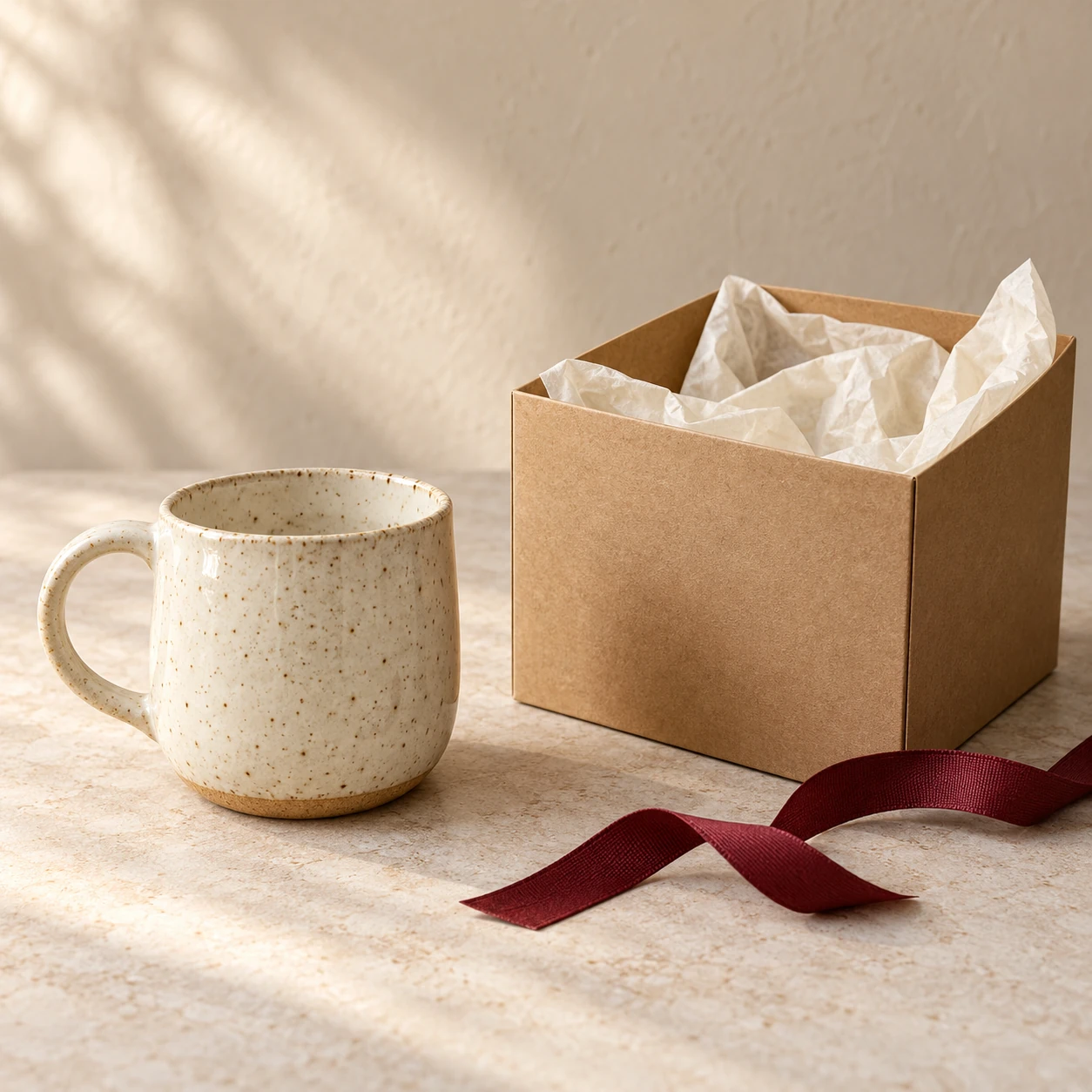
Show a pottery gift presentation with separate readable product and packaging, without inventing delivery promises.
Task: Create an original square Black Friday gift-packaging photograph for a fictional independent pottery shop.
Subject: Exactly one speckled cream ceramic mug with a single rounded handle, standing beside one open plain kraft gift carton lined with softly folded ivory tissue paper. The mug is outside the carton and fully visible.
Context: A small pottery retailer needs a campaign concept showing how a handmade-style mug can be presented as a gift. Real product details, delivery terms and the Black Friday offer will be added later by the retailer.
Style: Photoreal editorial product photography, warm craft-store styling, tactile uncoated cardboard, subtle ceramic glaze and softly crumpled tissue, natural cream and kraft palette with one muted burgundy ribbon.
Composition: One square 1:1 frame viewed from slightly above tabletop height. Arrange the mug on the left and the open carton on the right, with a visible gap between them on a pale stone tabletop. Show the entire mug including its handle and base. The carton has a simple open top, four believable walls and tissue inside; there is no separate lid. A short burgundy ribbon lies loosely in front of the carton, away from the mug. Keep the wall behind the objects plain and quiet so a designer can later choose a modest headline position.
Lighting: Soft natural window light from the upper left, gentle contact shadows under both objects, clear but restrained glaze highlights and readable paper folds; no dramatic glare.
Constraints: Exactly one mug, one open carton and one loose ribbon. No beverage, flowers, extra ceramics, hands, people, logos, stamps, labels, letters, numbers, price tags or watermarks. Do not merge the mug with the box, thread ribbon through an object or invent certification claims.
Output: One finished square 1:1 image, approximately 1024 by 1024 pixels or the closest supported native size. One continuous photographed scene, not a collage, grid, before-and-after comparison or mock storefront.
- Exactly one plausible mug with one complete handle beside one separate open carton.
- Carton has believable walls and tissue; mug and carton rest on the same surface.
- Ribbon stays separate from the mug and box; background remains quiet.
- No writing, logos, extra ceramics or invented fulfillment claims.
Adjust the brief
- Product
- One owned or fictional mug; preserve its shape when supplying a reference.
- Packaging
- Plain kraft carton and ivory tissue.
- Palette
- cream/kraft/burgundy
If the image misses the brief
If carton geometry or handle fails, simplify the packaging folds and regenerate with the same prompt ID; record the revised prompt and keep rejected output separate.
Fix the image before adding the sale message
Review an image against its brief rather than accepting it because the lighting looks attractive. A campaign concept can fail through a small layout mistake: a support block reaches into the headline area, two gloves overlap, or a tall handle occupies the space reserved for an email heading. Give the failed relationship a precise instruction and regenerate it before building the final ad.
The copy area disappears
Bound the product and its supports separately. Specify the side, the occupied area, and the area that must remain free. For a tall item, constrain its highest point as well as its base. Avoid asking an editor to rescue an image with a crop that removes the product.
The bundle gains extra items
List the exact objects, give each a clear position, and request visible surface between them. Count pairs as physical objects when necessary. Simplify the arrangement before adding more props or a more elaborate background.
Text or numbers are wrong
Remove the wording from a revised brief and generate a clean visual. Add the headline and genuine offer in an editor. Inspect even a short phrase; a convincing font does not mean every letter is correct.
The product looks artificial
Ask for one believable surface, controlled material reflections, a single main light direction, and a contact shadow. Check handles, closures, seams, fringe, and circular edges. More style adjectives rarely repair a broken object.
Use the e-commerce and marketing prompt handbook when you need a broader advertising direction. When you want a coordinated set of brand visuals rather than one seasonal placement, the e-commerce visual-system workflow explains how the parts relate.
Adapt the concept to an actual product
A fictional grinder or cream jar is useful for developing art direction. It is not evidence that a customer will receive an item with that shape, finish, size, or construction. When the picture represents real inventory, begin with a clear reference photograph you are allowed to use. Protect the details a shopper would use to identify the item: proportions, color, lid or closure, label wording, seams, materials, and included pieces.
Keep the reference-preservation request separate from the styling change. First describe what must remain identical; then ask for the background, light, and composition. Compare the result with the reference before using it in an advertisement. If the label, product silhouette, material, or included components change, revise the image rather than treating a near match as accurate.
Keep the offer factual. The blank card, empty wall, and open header areas are there for your verified campaign information. Add only genuine dates, prices, discounts, and product statements. The concept image does not supply those facts.
Black Friday gift guide images also need clear scope. A group of products can suggest a combination without proving that every piece is included in an advertised bundle. State the actual contents in your final layout and keep styling props distinct from sale items. Review both the image and the offer at the final size before scheduling the campaign.
Give Cyber Monday product images their own direction
The desktop-accessory prompt uses cooler light and a desktop collection so a follow-up can feel related without being the same image with a new date. Adapt that idea to your own category: keep the campaign's typography and offer structure consistent, then choose a product arrangement suited to the next message. Generate and inspect the new scene independently.
If you need more marketing image briefs after the seasonal campaign, browse the marketing prompt collection. Its other task examples can help you plan the next creative job. The model names used on other pages do not change how these particular examples were generated.
Black Friday image prompt questions
How do I write a Black Friday product ad prompt?
Name the commercial job first, then describe the product, setting, style, composition, lighting, constraints, and output. Specify where the product must sit and where the offer will go. Give supports and props their own boundaries so a large plinth or ribbon cannot fill your copy area. Finish with an object count and a short list of things to exclude.
Are these prompts free to copy?
Yes. The prompt text on this page is free to copy and adapt. Image generation depends on the availability and limits of the image tool you choose. Copying a prompt does not make an uploaded product photograph, logo, or other third-party asset yours to use.
Should AI write my discount, price, and sale dates?
Add genuine prices, discounts, dates, and buttons in an editor after generating the visual. Two examples use a short campaign headline, but even short lettering needs inspection. Keep the offer editable so an incorrect number or a changed launch date does not require rebuilding the whole scene.
Can I use these prompts for a real product?
The pictured products are fictional concepts. To represent an actual item, start with a clear product photograph you are allowed to use and explicitly preserve its shape, color, label, construction, and materials. Compare the result with the reference before advertising it. These concept examples do not demonstrate that a real product will remain unchanged.
Which image size should I use for my campaign?
The examples are production masters in landscape 3:2, portrait 2:3, or square 1:1 compositions. They are not universal advertising specifications. Check the current requirements of your website, email template, or advertising placement. Export or crop a separate version, then recheck the full product, copy space, readable type, and interface-safe areas at the final size.
How can I stop products from floating or merging?
Name one continuous support surface, one main light direction, and a contact shadow. State how many objects should appear and leave a visible gap between each. If a bundle still merges, simplify the arrangement to explicit left, center, and right positions. Regenerate the failed composition instead of hiding an extra product with a crop.
Can I adapt the prompts for Cyber Monday?
Yes. Use the desktop-accessory example as a separate follow-up direction, then adapt the subject and palette to your shop. Keep the real offer and date outside the generated image. If you replace the product or change the composition, inspect the new result again; a successful earlier example does not validate every later variation.