Santa caught on camera AI photo prompts: 10 free scene ideas
Santa caught on camera AI photo prompts describe a fictional holiday moment from a fixed home-camera viewpoint. Start with one camera position, one simple action and an invented room, then specify light direction, full-body framing and clear object counts. The ten free prompts below cover a living room, porch, monochrome hallway, garage, cabin and pet room. Copy a complete prompt into your GPT image tool, generate one still and inspect hands, feet, shadows and room scale before changing a single variable. These are original text-to-image scene concepts; personal-photo editing, preservation of your own room and video continuity require separate testing.
November 10, 2026 · English · Ten free copyable prompts
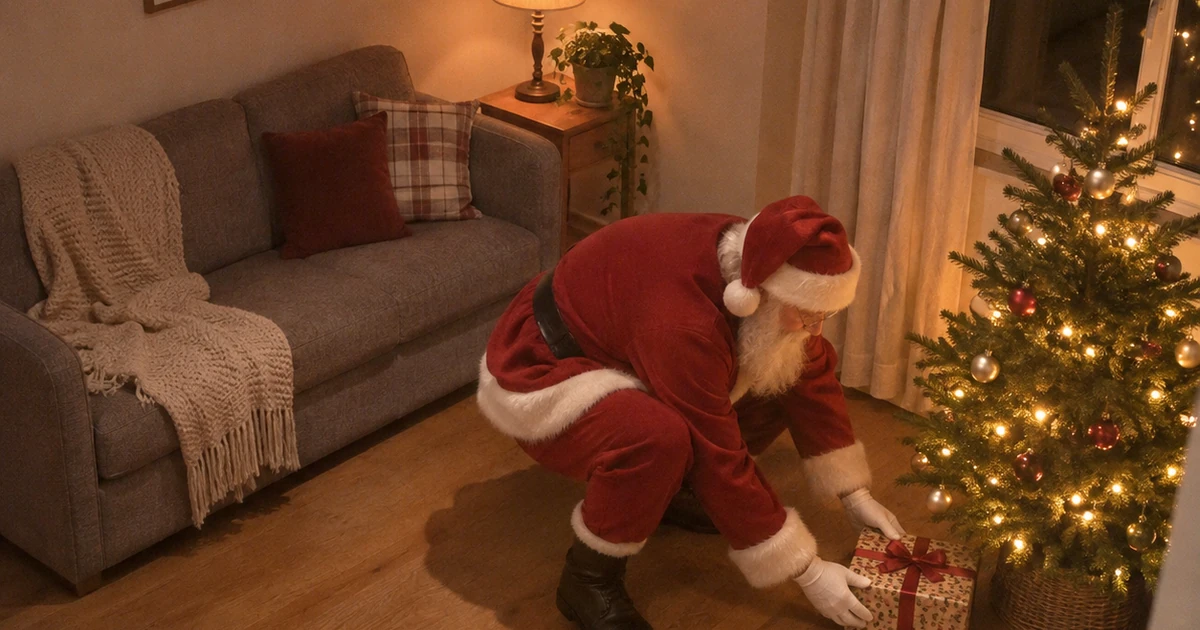
Start here: Build the still · Choose an angle · Ten complete prompts · Corrections · FAQ
How to build a believable fictional camera still
A useful Santa security camera photo prompt starts with the room’s geometry. Decide where a normal household camera could sit, what it can see and how much floor should remain around Santa. A stationary high corner makes the subject look smaller and exposes furniture placement. A doorbell view needs a consistent porch perspective. A low shelf view brings nearby objects into the foreground. Keeping that choice stable gives you a clear way to judge each new result.
- Choose one action. Placing one gift, carrying one sack or pausing beside one plate is easier to evaluate than several simultaneous actions. Describe the hands and props together so the physical relationship is explicit.
- Copy the complete prompt. Preserve the subject, camera, light, constraints and output instructions on the first attempt. Each prompt is self-contained, so you can paste one without reconstructing the scene from several fragments.
- Generate one frame. Request the stated square still. Check the actual result dimensions and allow enough surrounding space for the full body, doorway or furniture that establishes the viewpoint.
- Inspect structure before texture. Look at hands, boots, floor contact, prop counts and straight room lines. Only then judge compression grain, fabric detail and decorative lights.
- Revise one variable. Change the lamp position, room colour or camera height while keeping the action intact. Keep a copy of the prompt that produced the best structure, then use it as the next starting point.
The examples use fictional settings created from text. When sharing a result, describe it as an AI-created festive scene. A familiar camera viewpoint is a visual style and does not establish that an event occurred.
Choose the viewpoint before adding decorations
The setting should support the camera angle. Keep festive props few enough to count, and choose a light source that can plausibly illuminate the face and floor. This table helps you select a starting point and the first parameter to adjust.
| Scene family | Best starting prompt | Keep stable | First adjustment |
|---|---|---|---|
| Indoor home camera | 01 · Living-room delivery | High corner, complete boots, one gift | Table-lamp warmth |
| Doorbell camera Santa prompts | 02 · Porch visit | Mild wide angle, doorway scale, one sack | Porch bulb brightness |
| Night vision Santa AI photo | 03 · Monochrome hallway | Entirely monochrome, visible shadow detail | Grain strength |
| Small-space camera | 07 · Apartment entry | Compact landing, simple door and bench | Camera viewing height |
| Gift or prop scene | 05 · Bicycle surprise or 09 · Toy train | Simple object geometry and clear hands | Prop colour |
| Quiet pet-room scene | 10 · Pet-room visit | One dog, visible paws, separate outlines | Distance between bed and stool |
For a Santa CCTV still image, restrained detail usually serves the composition better than a long list of cinematic effects. Keep enough dynamic range to see Santa’s silhouette and the furniture. If you choose infrared-style night vision, let monochrome tones establish the camera treatment instead of combining them with colourful tree-light effects.
10 complete Santa caught on camera AI photo prompts
Every prompt specifies a single subject, a setting, a visual style, a viewpoint, lighting, constraints and an output. Each scene has its own action and physical layout. Start with its complete text, then use the parameters and correction below the card to refine the result. Reference images accompany the fictional text-to-image workflow; inspect every new generation in your own tool.
High-corner living-room delivery
Families planning a fictional indoor holiday scene
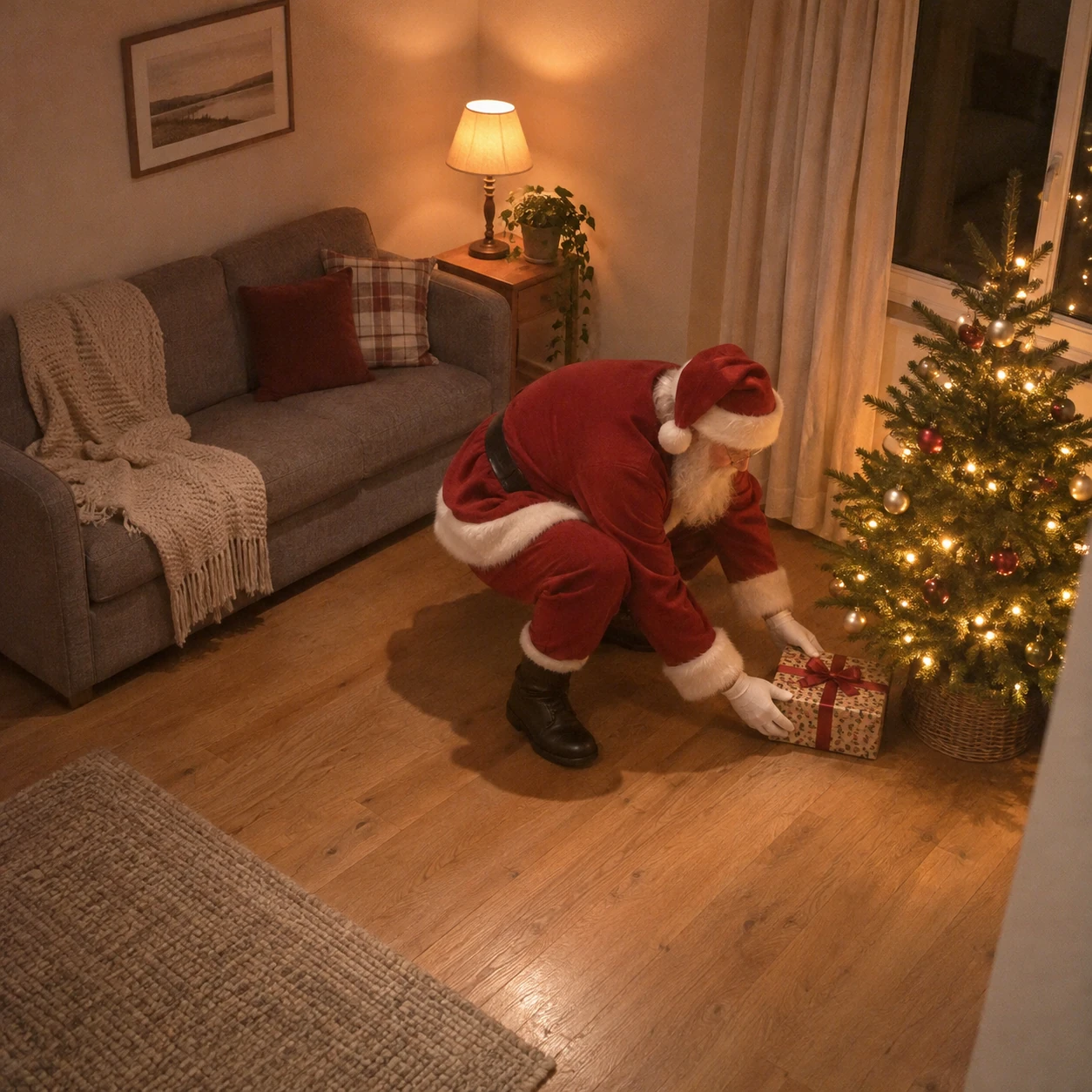
Use this for: Families planning a fictional indoor holiday scene. The goal is a single readable camera-style moment.
Task: Create one Santa caught on camera AI photo, a single frozen holiday moment.
Subject and context: one fictional Santa Claus in a red wool suit and plain white beard, crouching beside one small fir tree to set down one wrapped gift, in a modest living room with a grey sofa and oak floor. This is an invented festive scene for creative visual planning, not an actual surveillance recording.
Style: realistic home-camera photography, slightly soft consumer-camera detail and subtle compression grain, no glamorous studio retouching.
Composition: a fixed high-corner indoor camera, looking diagonally down; show his entire body, both boots and a clear floor contact shadow.
Lighting: dim amber tree lights mixed with a small warm table lamp.
Constraints: Keep exactly one Santa, one tree and one gift being placed. Keep both gloved hands separated and physically attached to his arms. Do not add text, a timestamp, a camera logo, a watermark, a border, a collage or multiple panels.
Output: One square 1:1 still image, at least 1024 by 1024 pixels, with the full scene inside the frame.
- Look for the crouching pose and the gift resting near the tree.
- Santa’s boots and the gift should share the same floor plane.
Adjustable parameters
- Scene variables
- lamp warmth, tree position, room size.
- Output
- Square 1:1 still; request at least 1024 × 1024 pixels.
- Camera treatment
- Keep the fixed viewpoint and a moderate amount of grain while changing one scene variable at a time.
Expected result
A coherent fictional holiday still with one clear action, readable room proportions and physically separated objects. Use the checks above to evaluate the generated frame.
Failure correction
If the room looks like a film set, simplify the furnishings and ask for flat home-camera exposure.
Reference workflow
ChatGPT built-in image generation from text, recorded as chatgpt-imagegen with no exact model version specified. The room is invented; this example does not test personal-photo editing, room preservation or video.
Doorbell-camera porch visit
Creators wanting a doorbell-style still
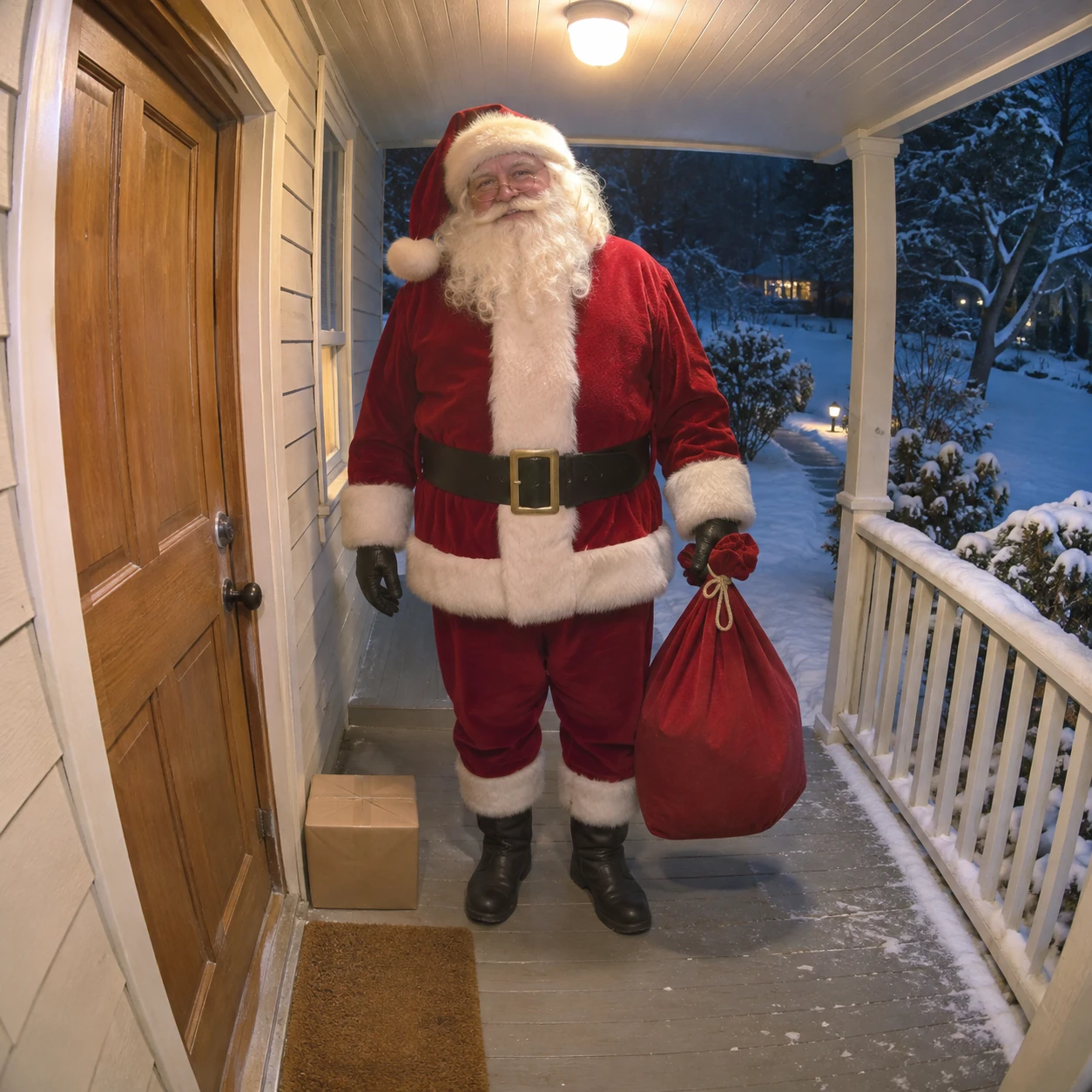
Use this for: Creators wanting a doorbell-style still. The goal is a single readable camera-style moment.
Task: Create one Santa caught on camera AI photo, a single frozen holiday moment.
Subject and context: one fictional Santa in a red winter suit holding one closed cloth sack by its tied neck in his left gloved hand, hanging beside his thigh and above the floor, paused on a small covered porch beside a plain wooden front door; a doormat and one unlabelled parcel sit on the floor. This is an invented festive scene for creative visual planning, not an actual surveillance recording.
Style: realistic home-camera photography, slightly soft consumer-camera detail and subtle compression grain, no glamorous studio retouching.
Composition: a doorbell-height viewpoint from beside the door, gently wide-angle; full body visible at believable adult scale, porch rail framing the distant snowy path.
Lighting: one overhead porch bulb balanced with cool blue night outside.
Constraints: Exactly one adult and no other people. Keep his left hand naturally gripping the tied neck of the sack and the boots resting on the porch. Do not bend the door frame. Do not add text, a timestamp, a camera logo, a watermark, a border, a collage or multiple panels.
Output: One square 1:1 still image, at least 1024 by 1024 pixels, with the full scene inside the frame.
- Look for one gloved hand holding the tied neck of the sack.
- Check the sack silhouette against the porch and the complete feet near the doorway.
Adjustable parameters
- Scene variables
- porch material, snowfall, bulb colour.
- Output
- Square 1:1 still; request at least 1024 × 1024 pixels.
- Camera treatment
- Keep the fixed viewpoint and a moderate amount of grain while changing one scene variable at a time.
Expected result
A coherent fictional holiday still with one clear action, readable room proportions and physically separated objects. Use the checks above to evaluate the generated frame.
Failure correction
If edges stretch, replace fisheye with a mild wide-angle lens and keep Santa away from the frame corners.
Reference workflow
ChatGPT built-in image generation from text, recorded as chatgpt-imagegen with no exact model version specified. The room is invented; this example does not test personal-photo editing, room preservation or video.
Monochrome night-vision hallway
People comparing a true monochrome camera look
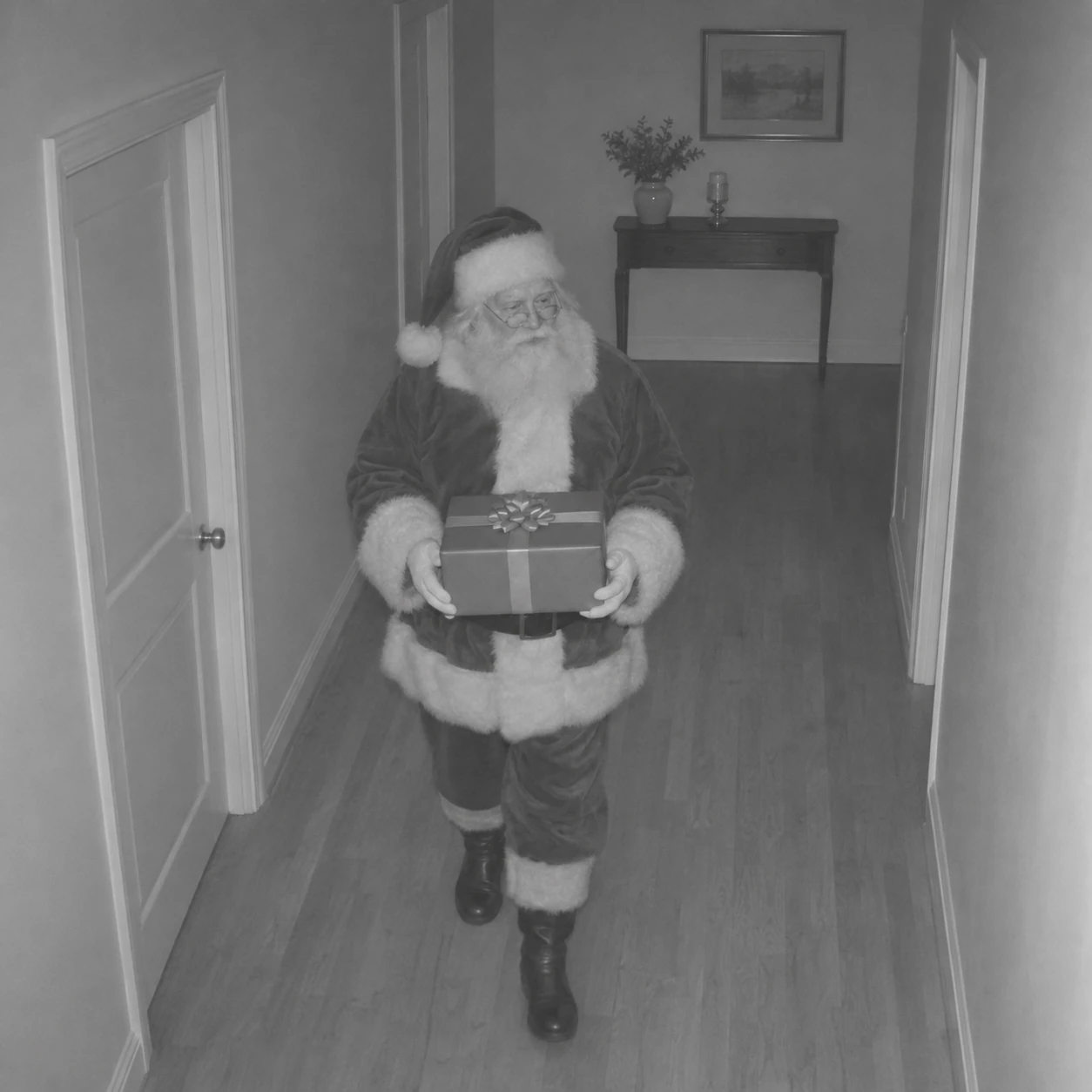
Use this for: People comparing a true monochrome camera look. The goal is a single readable camera-style moment.
Task: Create one Santa caught on camera AI photo, a single frozen holiday moment.
Subject and context: one fictional elderly Santa in a fur-trimmed winter suit walking through an uncluttered hallway with a closed gift box held at waist height; a narrow console table stands against the far wall. This is an invented festive scene for creative visual planning, not an actual surveillance recording.
Style: realistic home-camera photography, slightly soft consumer-camera detail and subtle compression grain, no glamorous studio retouching.
Composition: a fixed upper-wall home camera looking down the hall; full figure and both boots visible, generous space around the head.
Lighting: monochrome infrared-style grey tones, even low-light exposure and fine restrained sensor grain.
Constraints: Exactly one Santa, one held gift, and two naturally placed hands. No glowing supernatural eyes. No floating box, dramatic spotlight or motion streaks. Do not add text, a timestamp, a camera logo, a watermark, a border, a collage or multiple panels.
Output: One square 1:1 still image, at least 1024 by 1024 pixels, with the full scene inside the frame.
- Look for a fully monochrome hallway with separated hands.
- Check that the coat, beard and walls use greys rather than isolated colour patches.
Adjustable parameters
- Scene variables
- grain level, hallway width, viewing height.
- Output
- Square 1:1 still; request at least 1024 × 1024 pixels.
- Camera treatment
- Keep the fixed viewpoint and a moderate amount of grain while changing one scene variable at a time.
Expected result
A coherent fictional holiday still with one clear action, readable room proportions and physically separated objects. Use the checks above to evaluate the generated frame.
Failure correction
If the red suit remains coloured, request a completely monochrome image with no coloured pixels.
Reference workflow
ChatGPT built-in image generation from text, recorded as chatgpt-imagegen with no exact model version specified. The room is invented; this example does not test personal-photo editing, room preservation or video.
Shelf-camera view beside the stockings
Creators testing a low indoor camera angle
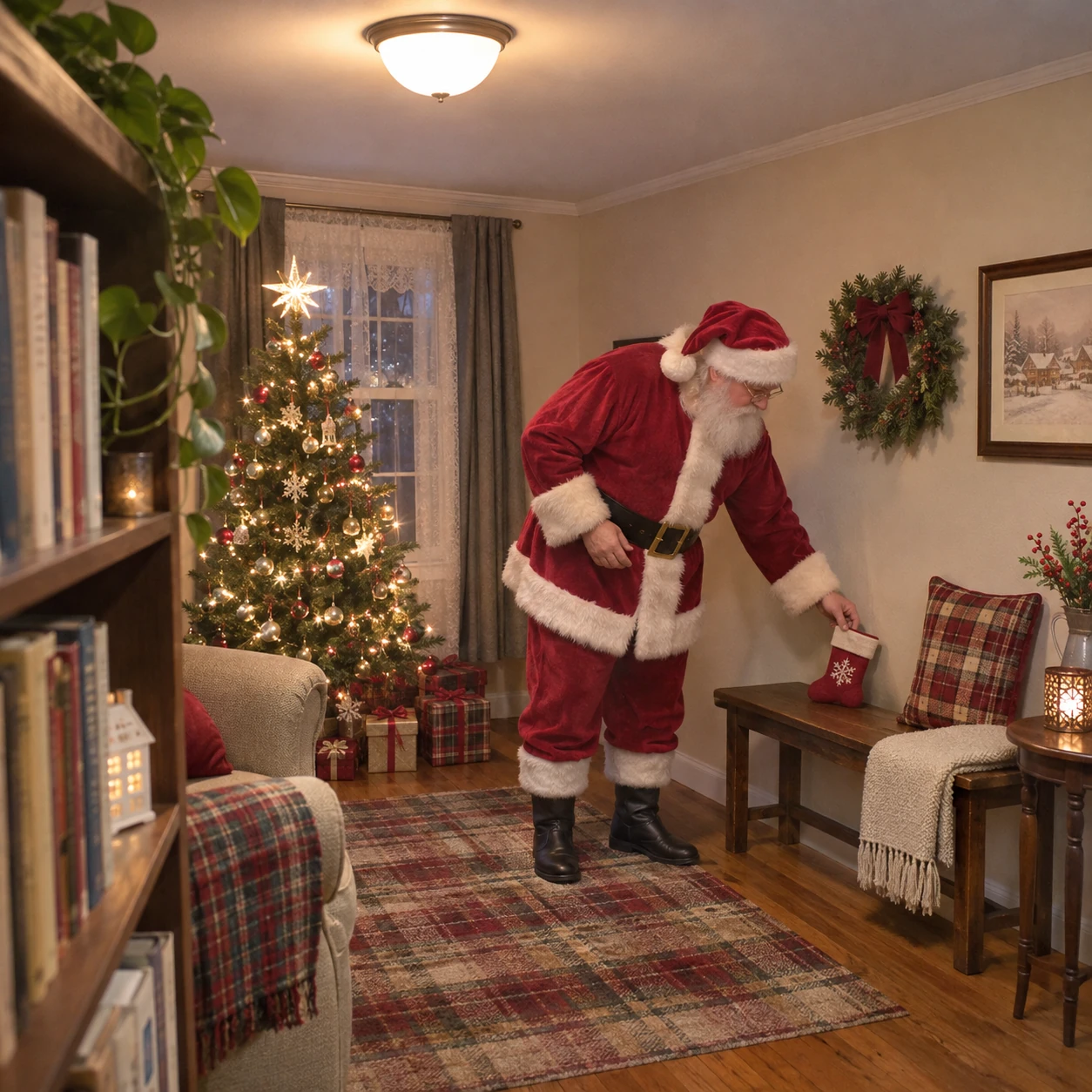
Use this for: Creators testing a low indoor camera angle. The goal is a single readable camera-style moment.
Task: Create one Santa caught on camera AI photo, a single frozen holiday moment.
Subject and context: one fictional Santa with a plain white beard in a soft red suit, leaning slightly to place a small cloth stocking on a low bench, inside a compact decorated sitting room. This is an invented festive scene for creative visual planning, not an actual surveillance recording.
Style: realistic home-camera photography, slightly soft consumer-camera detail and subtle compression grain, no glamorous studio retouching.
Composition: a fixed shelf-height view across the room; show the whole Santa from hat to boots and the entire bench, with a foreground bookshelf edge at one side.
Lighting: soft warm domestic ceiling light and faint tree-light glow.
Constraints: Exactly one adult. Keep the hands distinct, the bench legs vertical and the stocking made of fabric. No cropped hat, extra limbs or oversized chimney. Do not add text, a timestamp, a camera logo, a watermark, a border, a collage or multiple panels.
Output: One square 1:1 still image, at least 1024 by 1024 pixels, with the full scene inside the frame.
- Look for the low viewpoint with visible floor around the subject.
- The shelf edge can anchor the camera; it should not cover Santa’s hands.
Adjustable parameters
- Scene variables
- bench position, shelf edge, room colour.
- Output
- Square 1:1 still; request at least 1024 × 1024 pixels.
- Camera treatment
- Keep the fixed viewpoint and a moderate amount of grain while changing one scene variable at a time.
Expected result
A coherent fictional holiday still with one clear action, readable room proportions and physically separated objects. Use the checks above to evaluate the generated frame.
Failure correction
If Santa fills the frame, ask for a wider stationary view with empty floor around his feet.
Reference workflow
ChatGPT built-in image generation from text, recorded as chatgpt-imagegen with no exact model version specified. The room is invented; this example does not test personal-photo editing, room preservation or video.
Garage-camera bicycle surprise
Holiday gift-scene concept designers
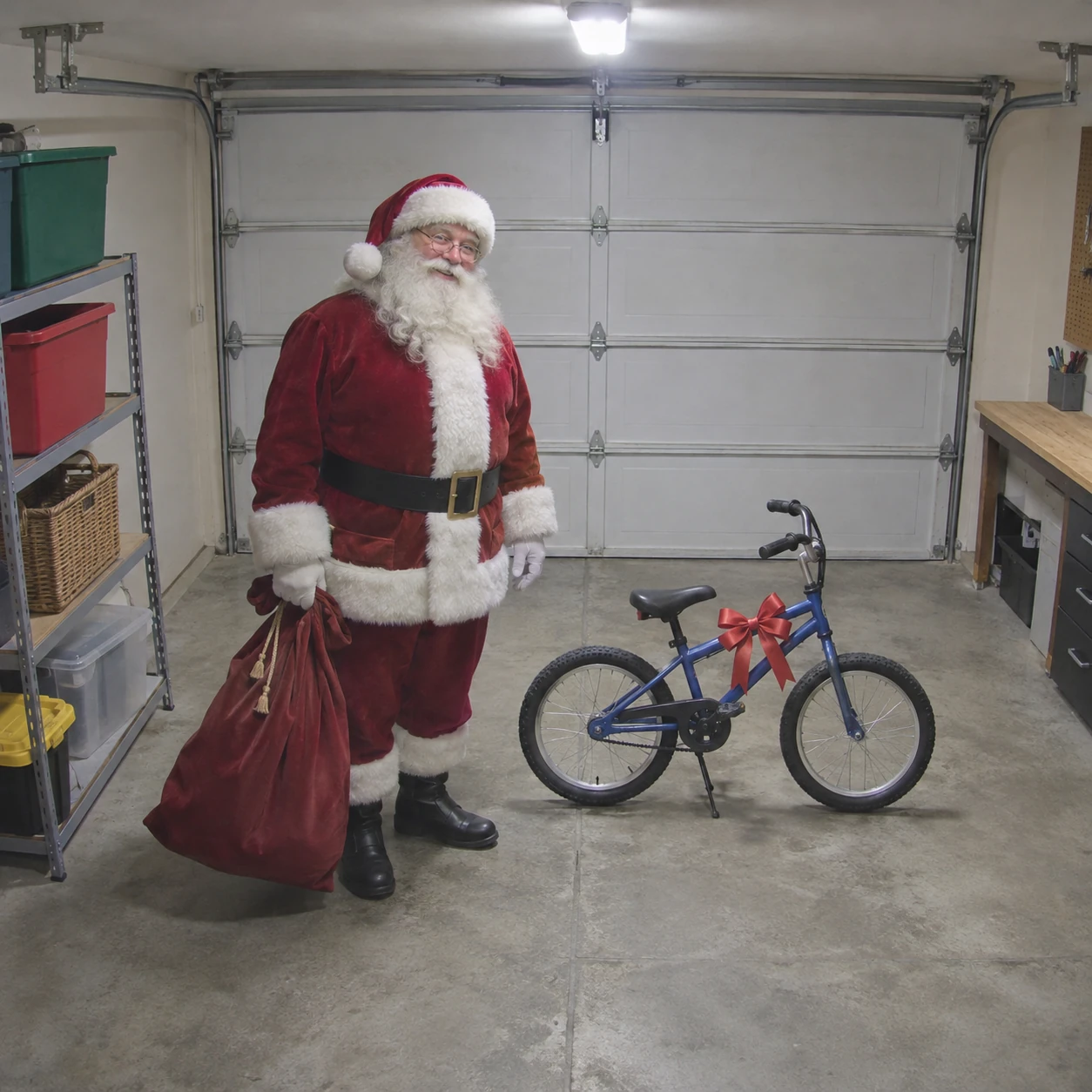
Use this for: Holiday gift-scene concept designers. The goal is a single readable camera-style moment.
Task: Create one Santa caught on camera AI photo, a single frozen holiday moment.
Subject and context: one fictional Santa in a red winter coat and matching trousers, standing beside one small unbranded bicycle tied with a single ribbon in a tidy residential garage. This is an invented festive scene for creative visual planning, not an actual surveillance recording.
Style: realistic home-camera photography, slightly soft consumer-camera detail and subtle compression grain, no glamorous studio retouching.
Composition: a fixed high wall-camera view; full Santa and the entire bicycle visible, bicycle wheels circular and both on the concrete floor.
Lighting: one ordinary cool-white garage light with gentle natural shadows.
Constraints: Exactly one adult, one bicycle with two wheels, no readable labels or numbers. Santa holds the cloth sack at his side without touching the bicycle handlebars. Do not add text, a timestamp, a camera logo, a watermark, a border, a collage or multiple panels.
Output: One square 1:1 still image, at least 1024 by 1024 pixels, with the full scene inside the frame.
- Look for the bicycle’s two-wheel structure and Santa’s placement beside it.
- Inspect the handlebar, frame and wheels before judging texture or grain.
Adjustable parameters
- Scene variables
- garage lighting, bicycle colour, ribbon.
- Output
- Square 1:1 still; request at least 1024 × 1024 pixels.
- Camera treatment
- Keep the fixed viewpoint and a moderate amount of grain while changing one scene variable at a time.
Expected result
A coherent fictional holiday still with one clear action, readable room proportions and physically separated objects. Use the checks above to evaluate the generated frame.
Failure correction
If the bicycle gains extra wheels, simplify it to a side-on child-sized bicycle with exactly two wheels.
Reference workflow
ChatGPT built-in image generation from text, recorded as chatgpt-imagegen with no exact model version specified. The room is invented; this example does not test personal-photo editing, room preservation or video.
Cabin hearth-camera still
Creators exploring a rustic interior
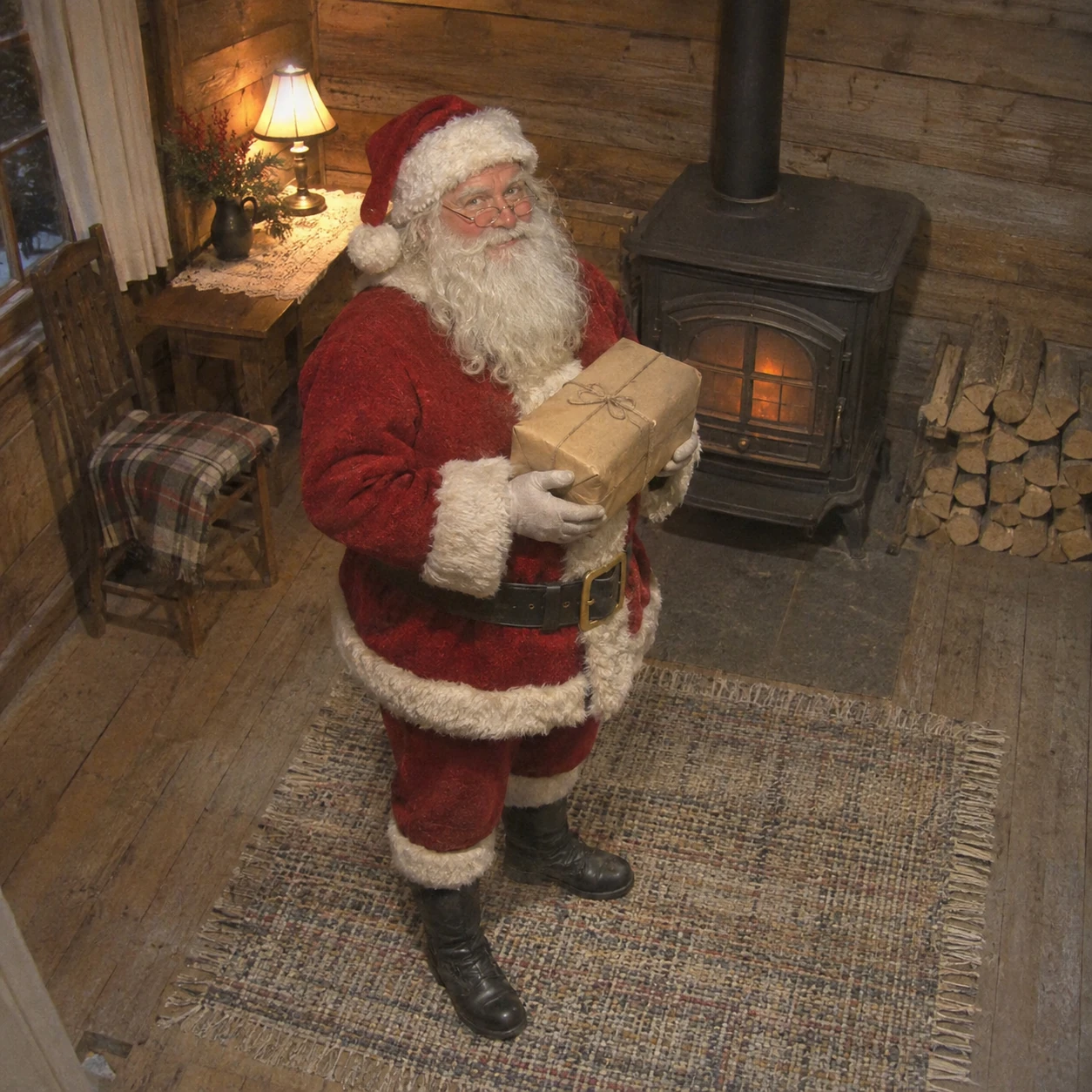
Use this for: Creators exploring a rustic interior. The goal is a single readable camera-style moment.
Task: Create one Santa caught on camera AI photo, a single frozen holiday moment.
Subject and context: one fictional Santa with a white beard and red wool suit, standing on a woven rug near a closed cast-iron stove in a small wooden cabin, holding one plain wrapped present. This is an invented festive scene for creative visual planning, not an actual surveillance recording.
Style: realistic home-camera photography, slightly soft consumer-camera detail and subtle compression grain, no glamorous studio retouching.
Composition: a fixed upper-corner camera angle; entire figure and boots visible, stove behind him at realistic scale, plain logs stacked against a wall.
Lighting: faint orange glow through the closed stove window, balanced by one dim warm lamp.
Constraints: One adult only. Keep the stove door closed and hands away from hot surfaces. No flames outside the stove, duplicate gift or exaggerated cinematic haze. Do not add text, a timestamp, a camera logo, a watermark, a border, a collage or multiple panels.
Output: One square 1:1 still image, at least 1024 by 1024 pixels, with the full scene inside the frame.
- Look for the modest cabin scale and restrained warm light.
- A contact shadow should connect Santa to the rug without a theatrical spotlight.
Adjustable parameters
- Scene variables
- wood tone, lamp brightness, rug pattern.
- Output
- Square 1:1 still; request at least 1024 × 1024 pixels.
- Camera treatment
- Keep the fixed viewpoint and a moderate amount of grain while changing one scene variable at a time.
Expected result
A coherent fictional holiday still with one clear action, readable room proportions and physically separated objects. Use the checks above to evaluate the generated frame.
Failure correction
If the hearth dominates, place the stove behind Santa and describe modest household lighting.
Reference workflow
ChatGPT built-in image generation from text, recorded as chatgpt-imagegen with no exact model version specified. The room is invented; this example does not test personal-photo editing, room preservation or video.
Apartment-entry landing
People planning compact-space camera concepts
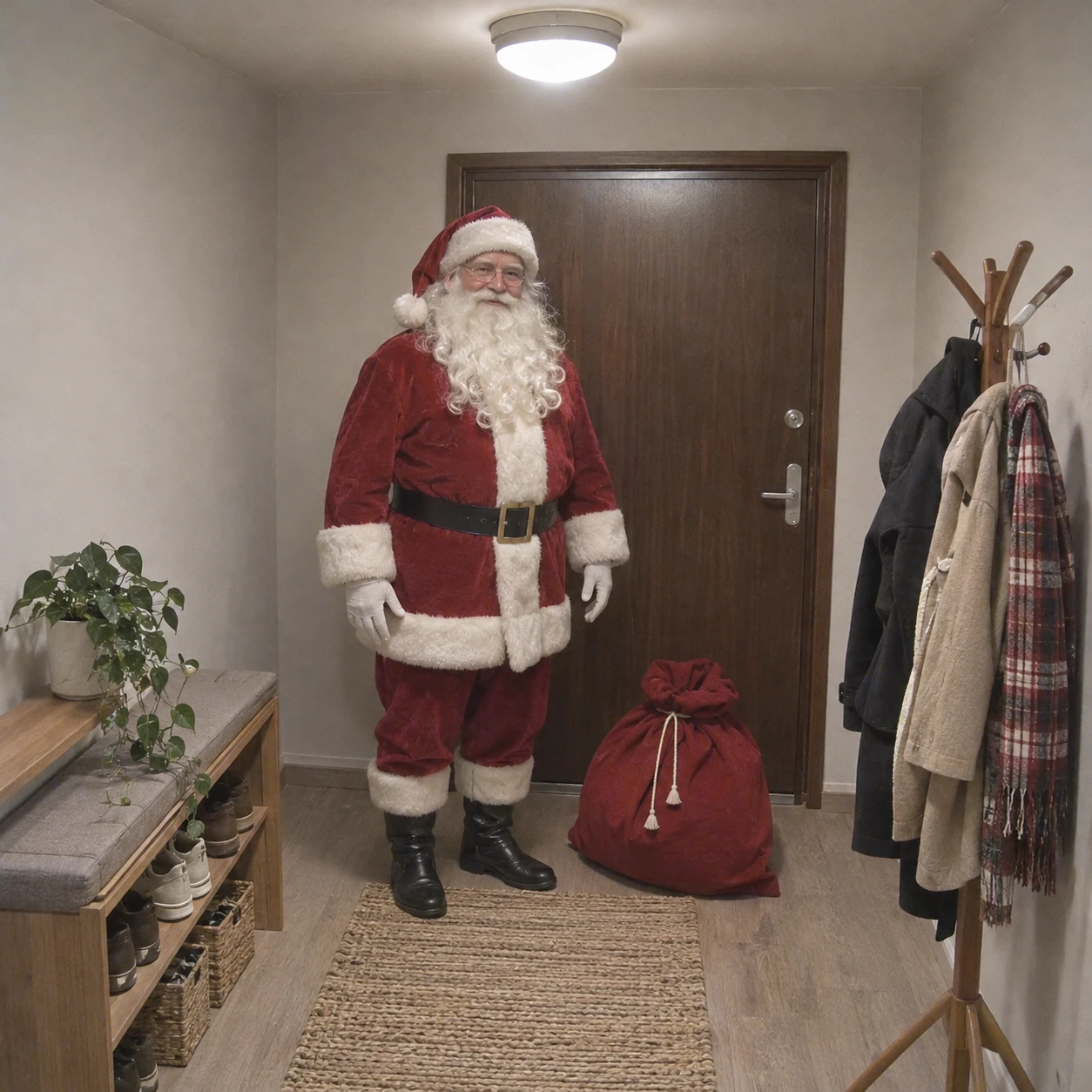
Use this for: People planning compact-space camera concepts. The goal is a single readable camera-style moment.
Task: Create one Santa caught on camera AI photo, a single frozen holiday moment.
Subject and context: one fictional Santa in a red winter suit and simple white gloves, paused inside a plain apartment entrance with a cloth gift sack on the floor at his side; a coat rack and shoe bench establish a small real home. This is an invented festive scene for creative visual planning, not an actual surveillance recording.
Style: realistic home-camera photography, slightly soft consumer-camera detail and subtle compression grain, no glamorous studio retouching.
Composition: a fixed high camera inside the hallway facing the entry door; full body visible with normal proportions and clear space between Santa and the furniture.
Lighting: soft practical hallway ceiling light, slightly desaturated home-camera colour.
Constraints: Exactly one adult. Keep the door closed, the sack on the floor, and both hands relaxed separately. No address numbers, neighbours, labels or extra hats. Do not add text, a timestamp, a camera logo, a watermark, a border, a collage or multiple panels.
Output: One square 1:1 still image, at least 1024 by 1024 pixels, with the full scene inside the frame.
- Look for a compact apartment landing and one clear doorway.
- Check the door, bench and body proportions together to judge room scale.
Adjustable parameters
- Scene variables
- wall colour, bench style, exposure.
- Output
- Square 1:1 still; request at least 1024 × 1024 pixels.
- Camera treatment
- Keep the fixed viewpoint and a moderate amount of grain while changing one scene variable at a time.
Expected result
A coherent fictional holiday still with one clear action, readable room proportions and physically separated objects. Use the checks above to evaluate the generated frame.
Failure correction
If the entrance grows into a mansion, repeat small apartment hallway with one simple closed door.
Reference workflow
ChatGPT built-in image generation from text, recorded as chatgpt-imagegen with no exact model version specified. The room is invented; this example does not test personal-photo editing, room preservation or video.
Kitchen cookie pause
Creators who want a quieter seasonal moment
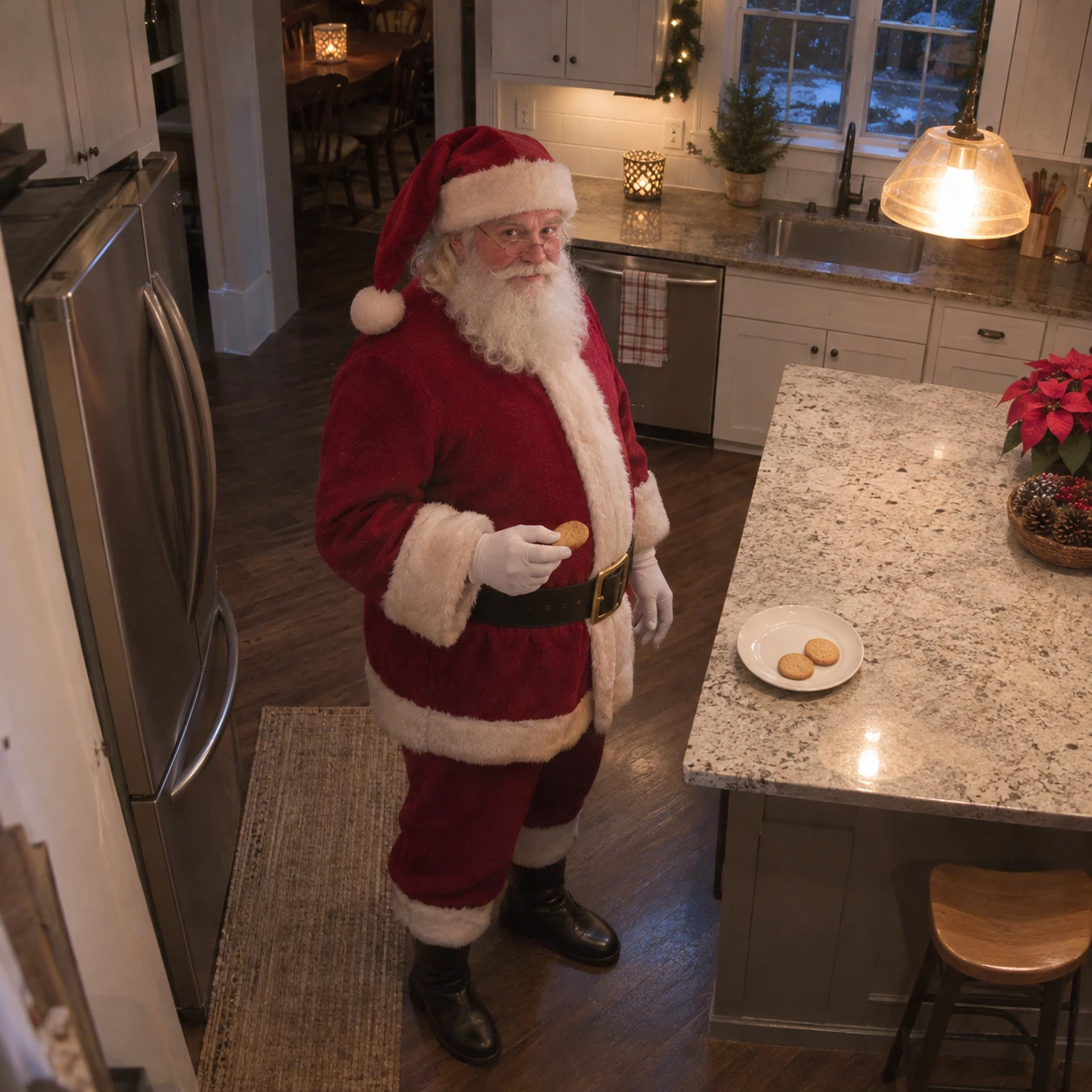
Use this for: Creators who want a quieter seasonal moment. The goal is a single readable camera-style moment.
Task: Create one Santa caught on camera AI photo, a single frozen holiday moment.
Subject and context: one fictional Santa in a red wool suit standing beside a kitchen island, holding one round biscuit in one gloved hand below chest level; a plain plate with two more biscuits sits on the counter. This is an invented festive scene for creative visual planning, not an actual surveillance recording.
Style: realistic home-camera photography, slightly soft consumer-camera detail and subtle compression grain, no glamorous studio retouching.
Composition: a fixed upper-corner kitchen camera; frame Santa from hat to boots and show the entire island edge, without close-up food styling.
Lighting: one modest warm kitchen light with faint cool window light in the background.
Constraints: One adult only. Keep the biscuit away from the mouth and beard, two hands separate, three biscuits total, no milk splash or readable packaging. Do not add text, a timestamp, a camera logo, a watermark, a border, a collage or multiple panels.
Output: One square 1:1 still image, at least 1024 by 1024 pixels, with the full scene inside the frame.
- Look for a simple cookie pause with distinct fingers.
- Check the biscuit, plate and hands for merged shapes or duplicated objects.
Adjustable parameters
- Scene variables
- counter material, biscuit shape, room warmth.
- Output
- Square 1:1 still; request at least 1024 × 1024 pixels.
- Camera treatment
- Keep the fixed viewpoint and a moderate amount of grain while changing one scene variable at a time.
Expected result
A coherent fictional holiday still with one clear action, readable room proportions and physically separated objects. Use the checks above to evaluate the generated frame.
Failure correction
If fingers merge with food, place the biscuit on the plate and let both hands rest visibly apart.
Reference workflow
ChatGPT built-in image generation from text, recorded as chatgpt-imagegen with no exact model version specified. The room is invented; this example does not test personal-photo editing, room preservation or video.
Toy-train delivery by the tree
Creators planning a toy-focused festive still
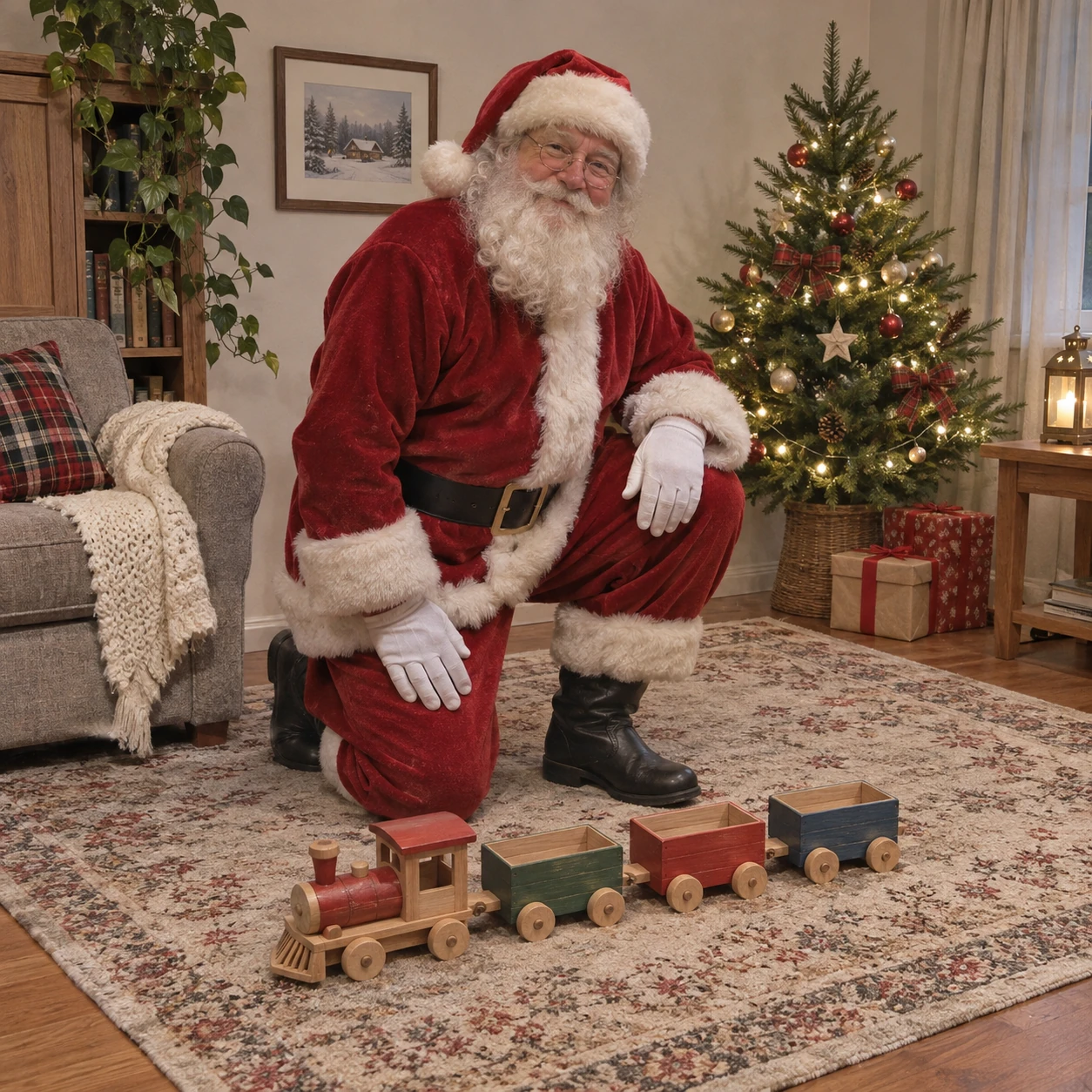
Use this for: Creators planning a toy-focused festive still. The goal is a single readable camera-style moment.
Task: Create one Santa caught on camera AI photo, a single frozen holiday moment.
Subject and context: one fictional Santa in a red winter suit kneeling on one knee beside one short wooden toy train on a living-room rug, with a small decorated fir tree in the background. This is an invented festive scene for creative visual planning, not an actual surveillance recording.
Style: realistic home-camera photography, slightly soft consumer-camera detail and subtle compression grain, no glamorous studio retouching.
Composition: a fixed chest-height indoor camera, mildly wide-angle; show his complete body, both gloved hands, the toy train and the edge of the rug.
Lighting: balanced warm room lighting with small soft tree lights, restrained highlights.
Constraints: Exactly one adult, one wooden toy train consisting of exactly four connected pieces: one locomotive at the front followed by three separate wagons, no children or other people. Keep the hands away from tiny train wheels and the head fully within frame. Do not add text, a timestamp, a camera logo, a watermark, a border, a collage or multiple panels.
Output: One square 1:1 still image, at least 1024 by 1024 pixels, with the full scene inside the frame.
- Look for a small readable toy train beneath the tree.
- Inspect the train connections and Santa’s fingers at a larger viewing size.
Adjustable parameters
- Scene variables
- train colour, rug texture, tree distance.
- Output
- Square 1:1 still; request at least 1024 × 1024 pixels.
- Camera treatment
- Keep the fixed viewpoint and a moderate amount of grain while changing one scene variable at a time.
Expected result
A coherent fictional holiday still with one clear action, readable room proportions and physically separated objects. Use the checks above to evaluate the generated frame.
Failure correction
If tiny parts distort, simplify the toy to three plain connected wooden blocks with visible wheels.
Reference workflow
ChatGPT built-in image generation from text, recorded as chatgpt-imagegen with no exact model version specified. The room is invented; this example does not test personal-photo editing, room preservation or video.
Quiet pet-room visit
Pet owners exploring a fictional room-camera concept
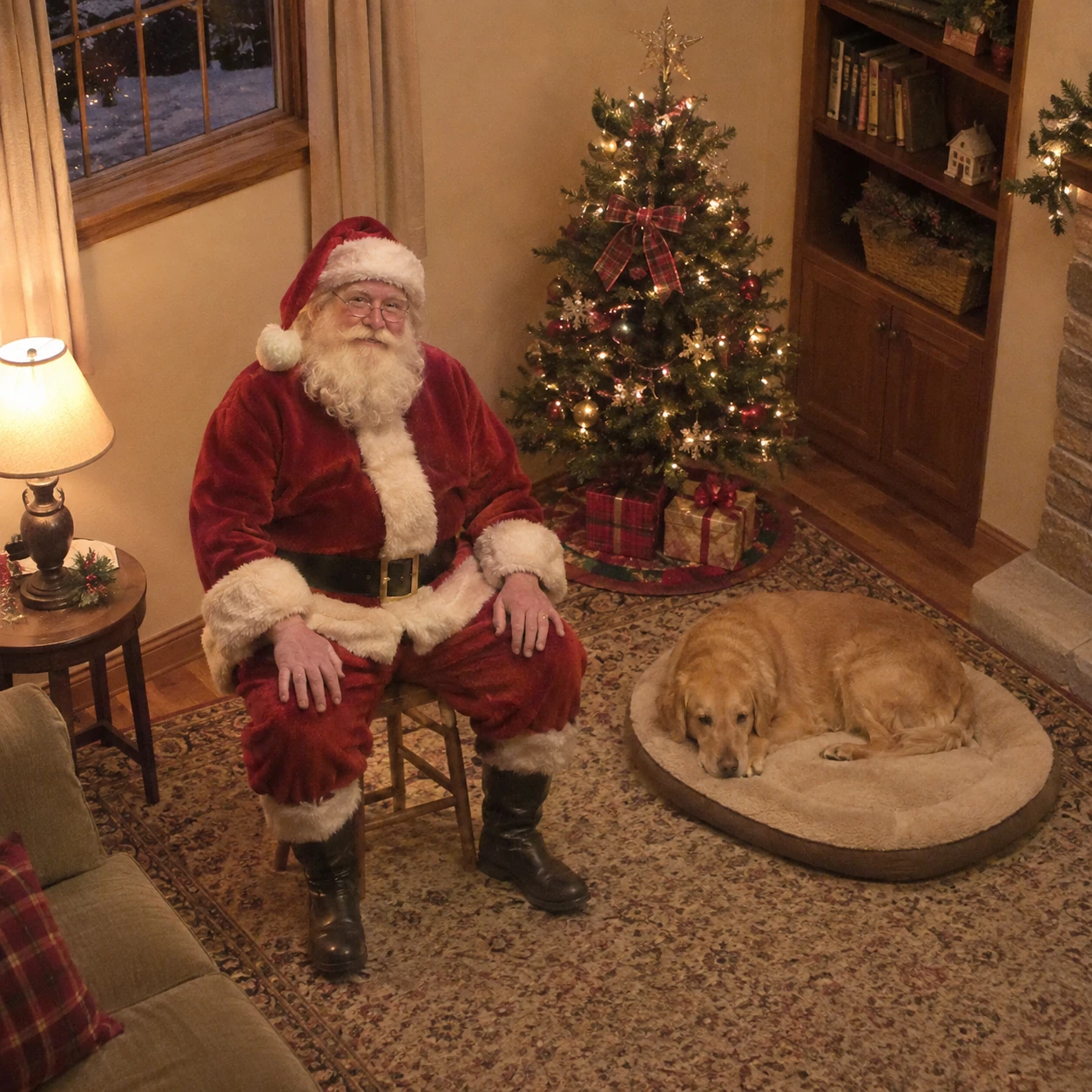
Use this for: Pet owners exploring a fictional room-camera concept. The goal is a single readable camera-style moment.
Task: Create one Santa caught on camera AI photo, a single frozen holiday moment.
Subject and context: one fictional Santa with a white beard and red wool coat seated on a simple stool near a small Christmas tree; one calm golden dog rests on a separate oval pet bed beside the stool. This is an invented festive scene for creative visual planning, not an actual surveillance recording.
Style: realistic home-camera photography, slightly soft consumer-camera detail and subtle compression grain, no glamorous studio retouching.
Composition: a fixed high-corner indoor camera with full Santa and full dog visible; clearly separate the stool, pet bed and tree.
Lighting: soft amber domestic lamp light, natural low contrast and light sensor grain.
Constraints: Exactly one adult and one dog. Keep Santa hands resting apart on his knees and the dog resting without physical contact. No extra paws, human-like animal hands or face resemblance to any real person. Do not add text, a timestamp, a camera logo, a watermark, a border, a collage or multiple panels.
Output: One square 1:1 still image, at least 1024 by 1024 pixels, with the full scene inside the frame.
- Look for the gap between Santa, the stool and the dog’s bed.
- Check the dog’s visible paws, Santa’s boots and the separate body outlines.
Adjustable parameters
- Scene variables
- dog type, bed colour, lamp position.
- Output
- Square 1:1 still; request at least 1024 × 1024 pixels.
- Camera treatment
- Keep the fixed viewpoint and a moderate amount of grain while changing one scene variable at a time.
Expected result
A coherent fictional holiday still with one clear action, readable room proportions and physically separated objects. Use the checks above to evaluate the generated frame.
Failure correction
If bodies overlap, increase the gap between the stool and the pet bed and keep every paw visible.
Reference workflow
ChatGPT built-in image generation from text, recorded as chatgpt-imagegen with no exact model version specified. The room is invented; this example does not test personal-photo editing, room preservation or video.
Fix the structure that makes the camera view feel wrong
A camera-style still depends on several ordinary details agreeing with one another. Use a targeted revision that names the visible error and the intended relationship. Regenerate after each important correction, because a repaired hand can also change the sack, coat or nearby furniture.
Santa floats above the floor
Ask for both boots resting on the same floor plane, a small contact shadow immediately beneath each boot and furniture legs that meet that floor. Keep the camera position fixed. More grain will not repair a broken ground relationship.
The room becomes a film set
Reduce the room to a few modest furnishings, remove spotlights and specify flat consumer-camera exposure. Keep the ordinary lamp or porch bulb visible in the description. A small, slightly imperfect room gives scale more clearly than an elaborate mansion.
Hands merge with a prop
Reduce the action to one hand holding one clear part of the object. Specify where the other hand rests. For the porch sack, check the gloved grip at the tied neck; for the kitchen scene, place the biscuit on the plate when a holding pose is unreliable.
The doorway bends or the body stretches
Use a mild wide-angle view, position Santa away from the frame edges and request straight doorposts. Keep the entire body inside the frame. If the doorway is still distorted, simplify the architecture before adding porch railings or decorations.
The scene is too dark to inspect
Ask for lifted shadow detail with a dim household light, while keeping the background subdued. Check the boots and the prop first. In monochrome night vision, a clear silhouette matters more than dramatic black areas or strong glowing highlights.
Small objects multiply or deform
Name an exact object count and simplify the shape. Use a side-on two-wheel bicycle or a short, plain toy train. Review the new frame at a larger size so repeated wheels, disconnected pieces and extra gifts are easy to notice.
Adapt the scene to a clear visual purpose
A search for a “Santa in my house photo prompt” can describe two different tasks: inventing a home interior from text or editing an existing room photograph. The prompts here address the first task. For a text-only concept, write down a few room features such as a grey sofa, a small tree and an oak floor. Repeating a manageable layout gives the image tool a concrete scene without implying that the room belongs to a particular household.
Choose a quiet action if you need a still for a holiday story, mood board or visual brief. One gift being placed is readable in a single frame. A bicycle surprise adds a clear prop but also creates more geometry to inspect. The pet-room option introduces a second living subject, so spacing and body outlines need extra attention. Keep the first successful frame as a reference for what worked, and save its complete prompt alongside your revised versions.
For portraits centred on people and relationships, use the Christmas family photo prompts or the Christmas couple photo prompts. Those guides offer a portrait-led starting point. To practice composition, lighting and constraint wording more broadly, continue with the prompt handbook.
Santa camera photo prompt questions
What are Santa caught on camera AI photo prompts?
They are text instructions for generating a fictional still that resembles a fixed home camera view. A useful prompt defines Santa’s action, an invented room, a camera position, modest lighting, clear object counts and one output frame. These ten examples use the built-in GPT image tool as a text-to-image workflow.
Can I use these prompts to put Santa in my own room photo?
The examples on this page use invented rooms generated from text. They do not establish how well an image tool preserves a particular uploaded room. For a personal-photo edit, check that your tool accepts image inputs, describe the intended change and inspect the unchanged furniture, walls and perspective separately.
Do these prompts make a Santa security camera video?
The requested output is one static image. A video would also need stable identity, continuous movement, timing and frame-to-frame consistency. Choose a convincing still first if you want a visual brief for a later video workflow.
How do I get a monochrome night vision Santa AI photo?
Use the hallway example and request a completely monochrome infrared-style still. Describe soft grey highlights, visible shadow detail and restrained grain. If red fabric survives as colour, repeat that every pixel must be monochrome and remove competing warm-light instructions.
Should I add a timestamp or a camera brand logo?
The prompts request clean images without lettering or logos. Add any date or fictional camera overlay separately in an editor when you need one, so its wording, placement and legibility remain under your control. Label the final image as an AI-created holiday scene when you share it.
What aspect ratio should I choose?
All ten reference prompts request a square 1:1 still at 1024 by 1024 pixels or larger. For a wider composition, change the output ratio before generation and keep the full subject, floor contact and important props inside the frame. Recheck the generated dimensions in your tool.
Can I include a dog in the scene?
The pet-room example includes one fictional resting dog with a clear gap between Santa and the pet bed. Use one simple pose and keep the paws visible. A recognisable portrait of your own pet would require a separate reference-image test; that identity-preservation workflow is not demonstrated here.
Are the prompts free, and which model made the references?
The prompt text is free to copy. Image generation access and usage limits depend on your chosen GPT image tool. The reference workflow uses ChatGPT’s built-in image generation tool, recorded as chatgpt-imagegen; an exact model version is not specified.