10 Professional Game Level & Map Design Templates with Nano Banana
Nano Banana Game Design Series:
Level Design is the soul of game development. This tutorial moves beyond generic "concept art" to focus on functional and aesthetic professional level design documents. Leveraging Nano Banana's multimodal capabilities, we generate comprehensive designs including Top-down layouts, Tactical Heatmaps, and Isometric Targets. Covering 10 hardcore sub-genres like MOBA, FPS, Open World, and Roguelikes.
01. Core Logic: The Meta Prompt
A game map is not just scenery; it is a "container for player behavior". Our Meta Prompt must encompass both "Spatial Logic" and "Game Mechanics".
Meta Prompt:
Prompt:
Create a professional Game Level Design Document for a [Game Genre] set in [Theme/Setting].
The image should feature a central [Viewpoint: Top-down/Isometric] map layout.
Key Design Elements:
1. **Structure**: Clearly defined paths, obstacles, and zones (e.g., choke points, safe zones).
2. **Annotations**: Use graphical overlays/icons to mark [Mechanics: Spawn points, Loot, Enemy patroll].
3. **Visual Style**: [Art Style: Blueprint/Concept Art/Hand-drawn], emphasizing readability and mood.
4. **Side Note**: Include a small inset or sidebar showing a "Visual Target" (3D render of a key area) or a "Legend" (Map keys).
Lighting: [Atmosphere].
*(Analysis: The core of this prompt lies in "Layout + Annotations". We force the model to generate not just terrain, but "Designer Notes", making the image look like a "construction blueprint" ready for 3D modelers.)*
02. Deep Dive: 10 Selected Scenarios
1. 5v5 MOBA Classic 3-Lane Map

Prompt:
Create a professional 5v5 MOBA game map design document, theme: [Magic Forest].
View: Direct Top-down view.
Structure: Classic "Three-Lane" layout (Top, Mid, Bot), with a winding river cutting through the center, complex jungle mazes between lanes.
Annotations: Mark with glowing icons: Red/Blue Bases (diagonal corners), Turret positions, Jungle Camp spawns (skull icons), River Ward spots.
Style: High-saturation hand-painted fantasy map style, clearly distinguishing "Grass", "River", and "Rock Obstacles".
Sidebar: Right side shows a 3D concept close-up of a "Defense Turret".
- Analysis: The core of a MOBA map is "symmetry" and "line of sight blocking". The prompt emphasizes the structure of the river and jungle, making it suitable for early-stage proposals in competitive game development.
2. Tactical FPS Indoor CQB Warehouse
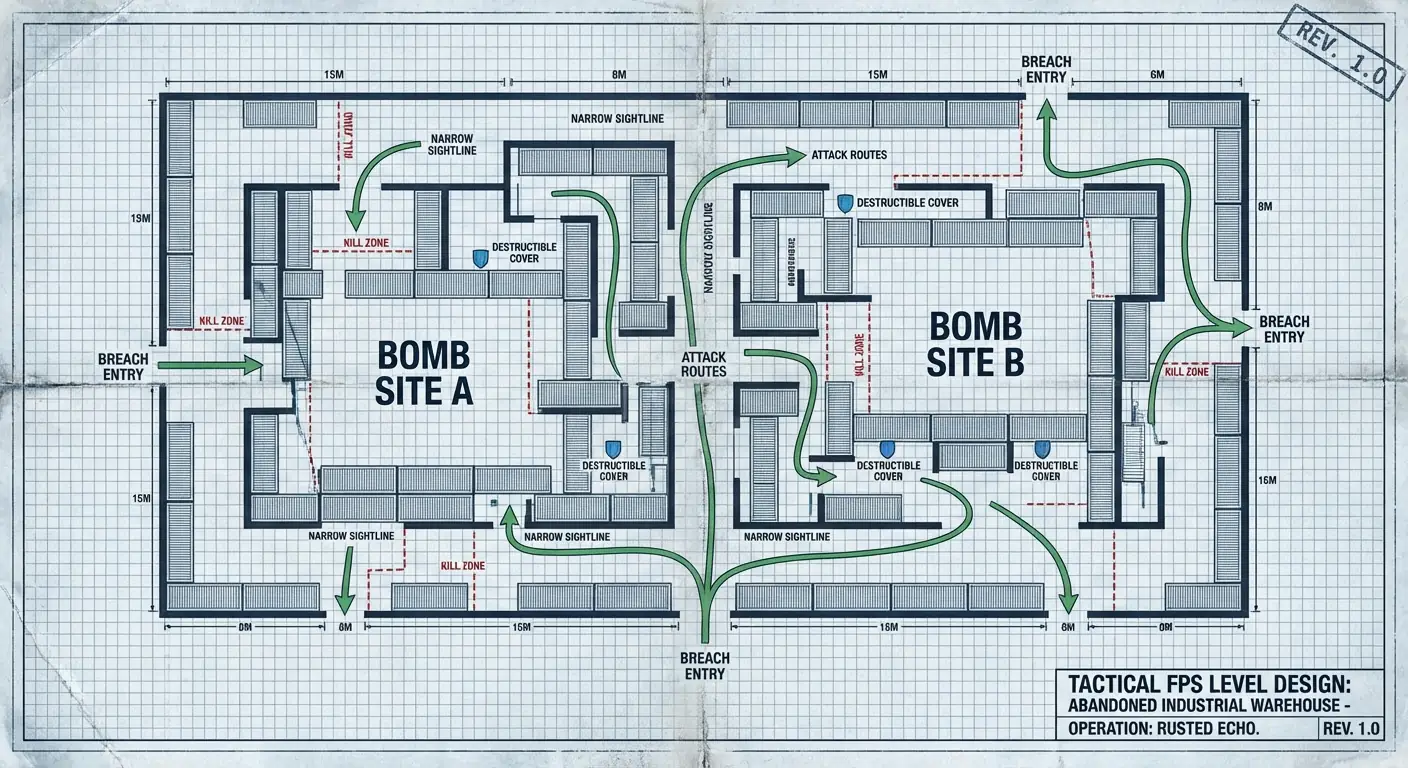
Prompt:
Create a Tactical FPS level design blueprint, setting: [Abandoned Industrial Warehouse].
View: Blueprint style Top-down.
Structure: Dense indoor cover layout, featuring stacked containers forming "Bomb Sites A/B", narrow Sightlines, and multiple breach entry points.
Annotations: Use red dashed lines to mark "Kill Zones", green arrows for "Attack Routes", blue shields for "Destructible Cover".
Style: Cool-toned engineering blueprint, with grid lines and dimension measurements, hardcore military style.
- Analysis: Targeted at games like CS:GO or Valorant, focusing on "firelines" and "cover" logic. The blueprint style perfectly embodies the tactical nature required.
3. Open World RPG Region Map
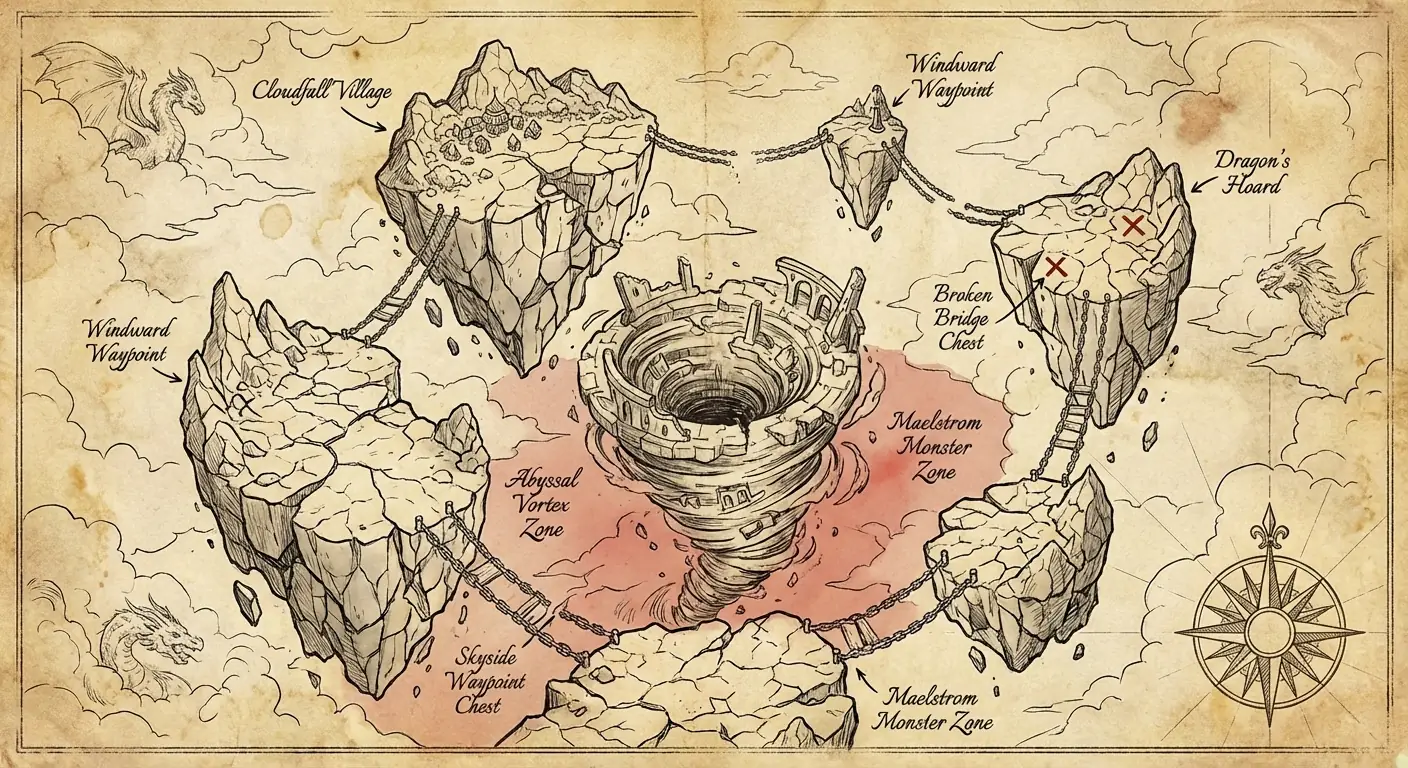
Prompt:
Create an Open World RPG region map, theme: [Floating Archipelagos].
View: Bird's eye view, similar to parchment map.
Structure: Several massive fractured islands connected by ancient chain bridges, centering on a giant vortex ruin.
Annotations: Handwritten labels: Village locations, Waypoints, Hidden Chest locations (X marks), High-level Monster Zones (Red shading).
Style: Vintage Fantasy Cartography, yellowed parchment texture, ink lines, decorated with a Compass Rose at the edge.
- Analysis: Ideal for world-building in Zelda or Genshin-like projects. The parchment style adds immersion and narrative depth.
4. Roguelike Dungeon Generation Logic

Prompt:
Create a Roguelike game dungeon generation logic map, theme: [Dark Catacombs].
View: Node-based Layout + Top-down rooms.
Structure: Procedurally generated rooms connected by narrow corridors, forming a branching tree structure.
Annotations: Color-coded rooms representing functions: Start (Green), Combat (Grey), Elite Enemy (Red), Shop (Gold), Boss Room (Purple).
Style: Pixel Art or Minimalist Geometric style, emphasizing the algorithmic beauty of "Procedural Generation", dark background.
- Analysis: For Roguelike development, the focus is on room connection logic (topology) rather than specific single-room details.
5. 4X Strategy Game Hex Grid Map
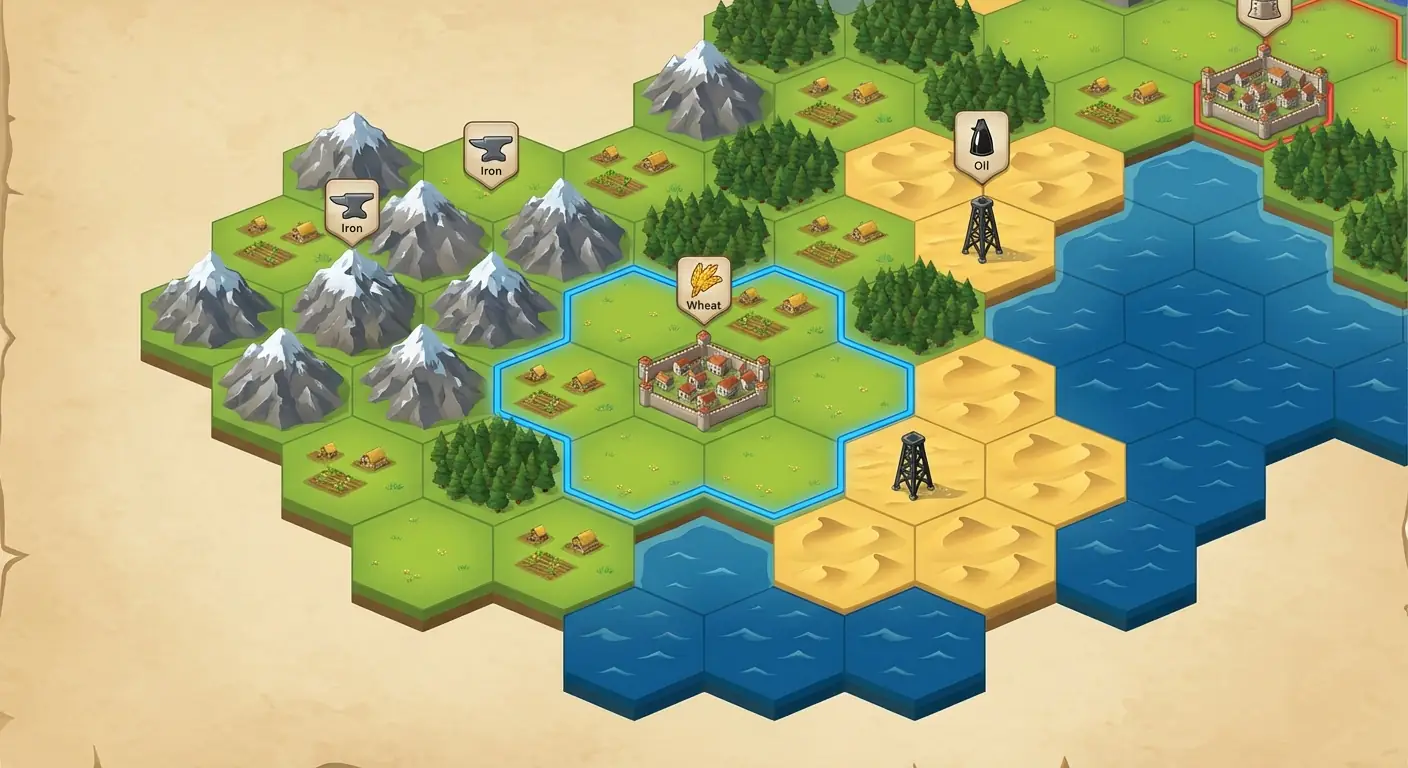
Prompt:
Create a 4X Strategy Game (like Civilization) map, using a [Hexagonal Grid] system.
Structure: A continent assembled from hexagonal tiles, including Plains, Mountains, Forests, Deserts, and Ocean tiles.
Annotations: Resource icons floating above grids (Iron, Wheat, Oil), City units occupying single hexes, colored border lines indicating "Territory Range".
Style: Exquisite 2.5D Vector Illustration style, vibrant colors, each hexagon looking like a detailed Miniature.
- Analysis: The hallmark of SLG games is the "hexagon". This case emphasizes resource distribution and territorial borders, perfect for strategy mobile or PC game design.
6. 2D Metroidvania Cross-section Map

Prompt:
Create a "Metroidvania" style side-scrolling level map, theme: [Steampunk Clock Tower].
View: Side-scrolling Cross-section.
Structure: Vertically distributed complex rooms, including platforming sections, hidden walls, elevator shafts, and Save Rooms.
Annotations: Color-coded "Ability Gates" (e.g., areas requiring Double Jump), marking Boss Room location and Shortcut doors.
Style: Detailed level sketch with grid background, Cyber-Victorian style, color blocks distinguishing zones (from Sewer bottom to Gear Room top).
- Analysis: Metroidvania games emphasize "exploration" and "ability gates". The side-scrolling cross-section is the standard format for designing such games.
7. Battle Royale Island Tactical Map

Prompt:
Create a Battle Royale tactical map, theme: [Tropical Military Island].
View: Satellite Map Style.
Structure: A massive isolated island featuring major POIs like Harbor, Radar Station, Ruined City, and Power Plant.
Annotations: White circles marking the "Safe Zone", Yellow highlights for "Hot Drops" (High Loot), marking Vehicle Spawn points.
Style: Realistic Satellite Photography style, overlaid with digital UI elements (Grid coordinates, Player Count panel).
- Analysis: For PUBG or Apex-style games, the core lies in macro-terrain and the presentation of the "circle closing" mechanism.
8. City Builder Town Planning Map
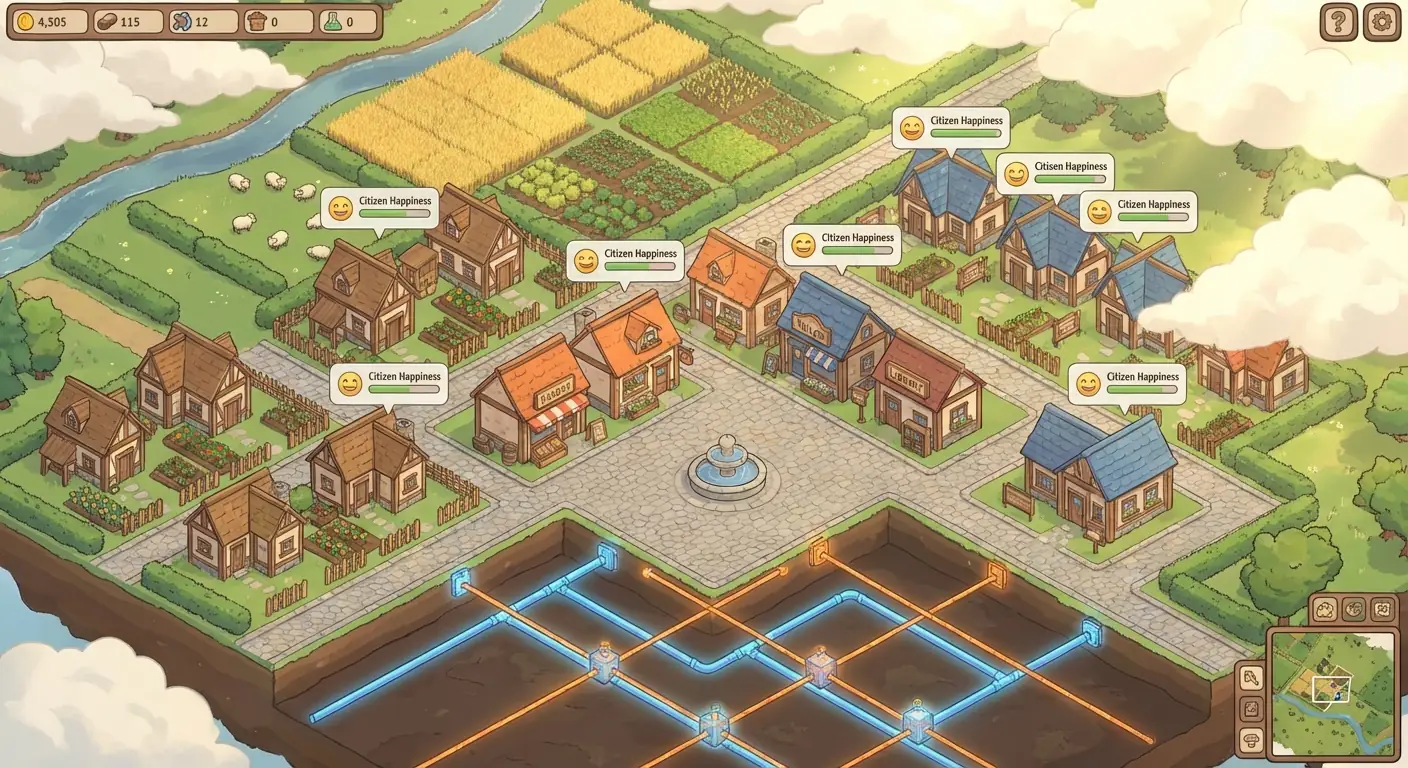
Prompt:
Create a City Builder / Sim town planning map, theme: [Cozy Pastoral Town].
View: Isometric View.
Structure: Gridded town layout, centered on a plaza and fountain, surrounded by shops, houses, and farmlands.
Annotations: Floating UI bubbles showing "Citizen Happiness" icons (Smileys), Water/Power pipe network overlay (Underground x-ray effect).
Style: Fresh and healing Cel-shaded render, soft sunlight, a mix of Animal Crossing and Cities: Skylines vibes.
- Analysis: Simulation games focus on the exquisite feel of "miniature landscapes". Isometric view is the best choice for showcasing architectural details.
9. Survival Horror Mansion Blueprint
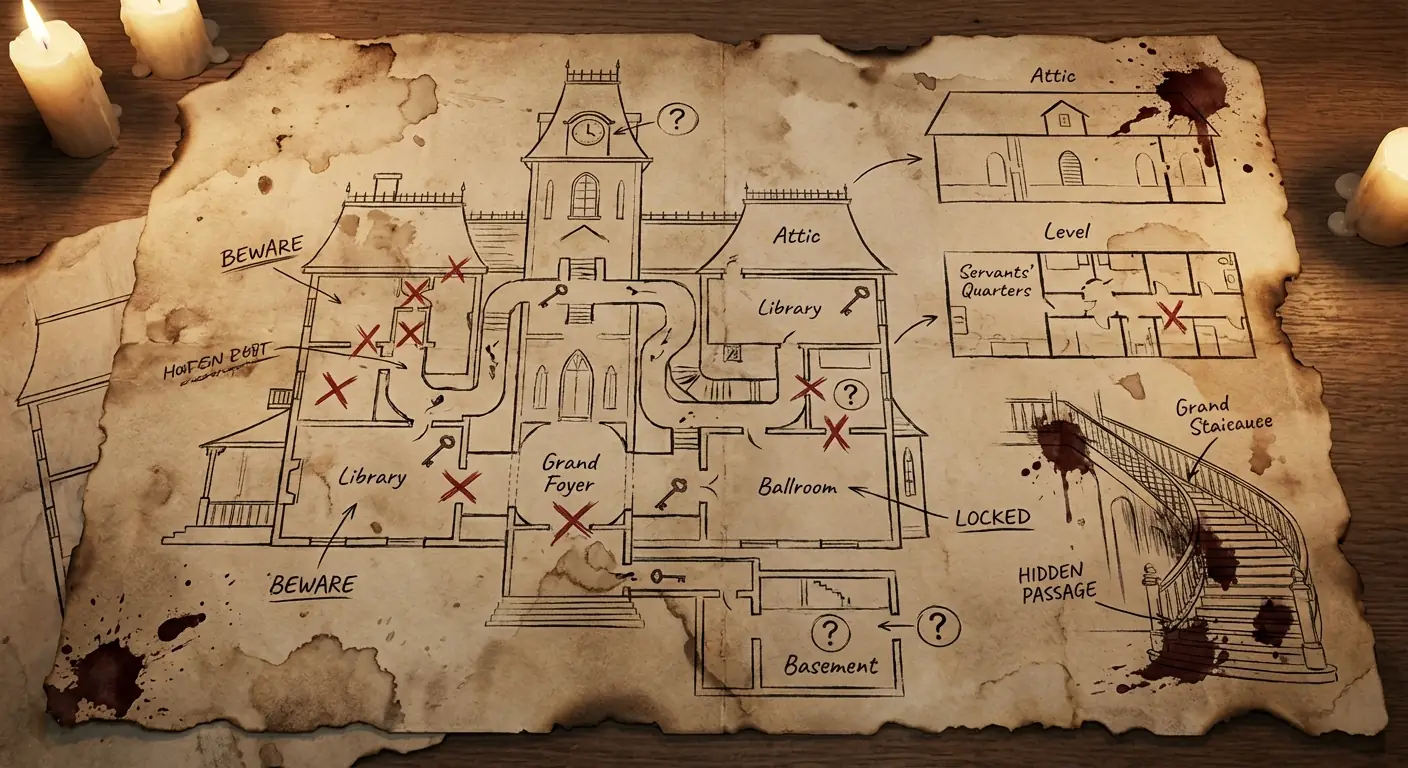
Prompt:
Create a Survival Horror mansion blueprint, theme: [Haunted Victorian Mansion].
View: Multi-floor Floorplan.
Structure: Complex corridors, locked doors, hidden chambers, grand staircase hall.
Annotations: Red "X" marking locked doors, Key icons for key items, "?" for puzzle locations, bloodstains in dark corners.
Style: Worn paper with burnt edges, ink stains, creating an oppressive horror atmosphere, looking like an in-game map item.
- Analysis: In survival horror games (like Resident Evil), the map itself is part of the narrative, emphasizing "lockdowns" and "puzzles".
10. Racing Game Circuit Design

Prompt:
Create a pro Racing Game circuit design document, theme: [Neon Night City Track].
View: Circuit Layout Overview.
Structure: Closed-loop circuit, containing straight acceleration zones, Hairpin turns, S-curves.
Annotations: Color gradients indicating "Recommended Speed" (Red slow, Green fast), marking "DRS Zones", marking "Pit Stop" entry.
Style: Modern Sports Graphic Design, dark background, neon light strips outlining the track, telemetry data charts decoration.
- Analysis: Racing game maps focus on "driving rhythm". Circuit diagrams demonstrate the sense of speed through curve design.
03. Nano Banana Pro Tips
Camera Angle Keywords:
Map design hates confused perspectives. To plan a layout, you must lock the view at the start of the prompt:- "Top-down view": Best for MOBA, Strategy, Blueprints, clear layouts.
- "Isometric view": Best for Sims, Tactics, adds volume and artistic feel.
- "Cross-section": Only for side-scrolling games (like Case 6).
Avoid Over-rendering:
Map designs need clarity. If you use an "overly realistic" style, paths and obstacles might blend together.- Tip: Use keywords like "Blueprint", "Schematic", or "Vector illustration" to ensure clean lines and defined functional zones.
UI Interference:
Although we ask for "Annotations", sometimes the model generates text that looks like gibberish.- Tip: Focus on the accuracy of Icons and Color Coding. Ignore specific text spelling errors; you can add correct game terminology in Photoshop later.